Microsoft Entra ID Desk Booking
Microsoft Entra ID Sign-In for Desk Booking
DeskFlex lets employees sign in using existing Microsoft work credentials, helping IT teams eliminate extra accounts and make sign-in easier for everyone.
Book a DemoToo many passwords. Too much user management.
Employees shouldn't need separate credentials to access workplace tools.
When workplace scheduling systems require their own accounts, IT teams spend more time managing users, onboarding takes longer, and employees face unnecessary friction just to access the tools they need.
Connect Microsoft authentication to DeskFlex
Connect
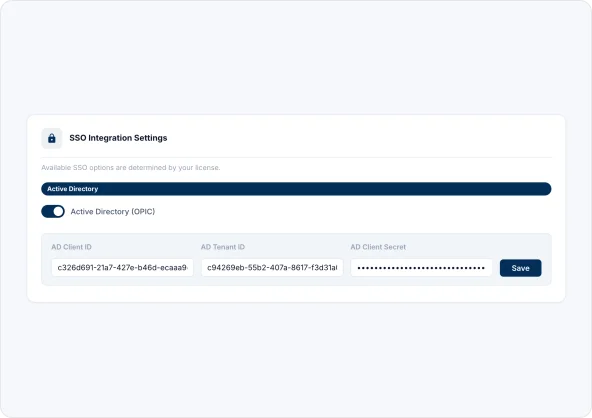
Register DeskFlex as an application in Microsoft Azure and generate a Client ID, Tenant ID, and Client Secret.
Configure
Enable Active Directory in DeskFlex settings and then go to Login & SSO and complete the Grant Admin Consent process.
Use
Employees can sign in using their Microsoft work account, and new DeskFlex accounts are automatically created during first-time login.
Simplify employee sign-in without creating more accounts

One Microsoft login. One less thing to remember.
Allow employees to access DeskFlex using their existing Microsoft work account without managing additional usernames and passwords.
Desk Booking
Automatically provision new user accounts during setup
Create DeskFlex accounts automatically during first-time login, reducing manual setup and onboarding effort for IT teams.
Office Space Optimization
Unlock Outlook sync and Teams visibility in one setup
The same Entra ID connection that handles sign-in also enables Outlook calendar sync and Microsoft Teams availability in DeskFlex.
Microsoft 365 IntegrationBuilt for teams managing workplace access

IT managers & directors
Manage access through Microsoft while reducing account setup, password issues, and onboarding work.
Hybrid Work Management
Facilities Managers
Let employees access DeskFlex using their Microsoft work account instead of managing another username and password.
Facilities Management
Operations managers
Automatically provision users on first login and reduce the manual work involved in onboarding new employees.
Return to Office
Microsoft 365 integration
Support Microsoft authentication, Outlook calendar sync, and Teams availability through a single Microsoft setup.
View Integration
Microsoft Outlook integration
Automatically synchronize desk reservations and room bookings with employee Outlook calendars.
View IntegrationSee how DeskFlex works with Microsoft Entra ID
Explore how Microsoft authentication and automatic user provisioning reduce the setup work for IT and the friction for everyone else.