


In today’s hybrid and flexible workplace era, traditional assigned seating and manual room scheduling simply don’t work. Room booking software and hot desking systems have become essential tools for optimizing space, empowering employees, and boosting workplace productivity.
This complete 2026 guide explains how these tools integrate with modern work environments, why companies are adopting them, what features matter most, and how DeskFlex helps businesses thrive.
What Is Room Booking Software?
Room booking software is a digital system that allows employees to reserve meeting rooms, conference spaces, and collaborative areas with real-time availability. It replaces manual calendars and sticky-note schedules, providing:
Real-time room visibility
Automated booking and cancellation
Conflict prevention
Calendar integrations (Outlook, Google Calendar)
Analytics and utilization reporting
What Is Hot Desking and Why It Matters
Hot desking is a flexible workplace seating strategy where employees reserve desks on an as-needed basis rather than having permanent assignments.
Today’s hot desking is powered by software that enables:
Interactive floor plans
Desk availability by day/hour
Mobile reservations
QR check-in
Team zone bookings
This supports hybrid work, reduces real estate costs, and improves employee autonomy.
Why Room Booking and Hot Desking Are Critical in 2026
Modern workplaces face new dynamics:
1. Hybrid Work Patterns
Employees split time between home, office, and remote locations. Static seating and manual scheduling no longer match flexible schedules.
2. Space Utilization Optimization
Organizations want to reduce unused desks and meeting rooms and use analytics to improve utilization.
3. Improved Employee Experience
Self-service booking increases satisfaction, reduces stress, and empowers employees.
4. Workplace Efficiency
Automated systems eliminate double bookings and scheduling conflicts.
5. Cost Control
Better space planning means lower real estate and facilities costs.
Top Features of Modern Room Booking & Hot Desking Systems
When evaluating solutions, these capabilities are must-haves:
Real-Time Availability & Maps
Interactive floor plans show live desk and room availability.
Calendar Sync
Integrations with Microsoft 365, Outlook, Teams, and Google Workspace ensure up-to-date schedules.
Mobile & QR Check-In
Users reserve spaces on a phone and check in via QR or mobile app.
Capacity & Compliance Controls
Admins can enforce limits, optimize seating zones, and comply with safety policies.
Automated Notifications
Reminders, confirmations, and no-show releases minimize wasted space.
Usage Analytics
Dashboards provide insights on peak times, utilization patterns, and planning trends.
Custom Booking Rules
Set rules for teams, departments, or special events.
Room Booking vs Hot Desking: How They Work Together
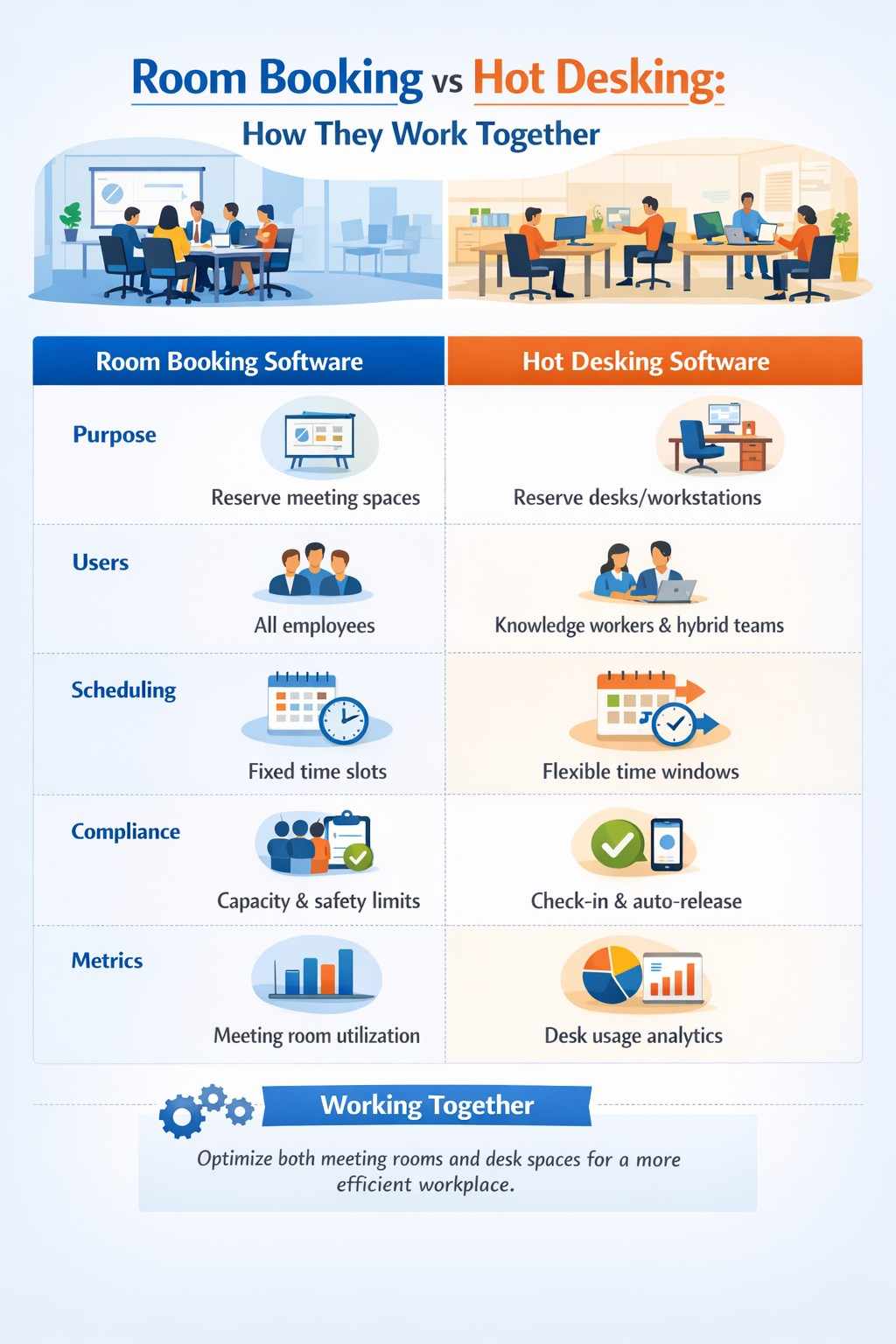
Together, these systems create a seamless hybrid workplace infrastructure that supports both collaboration and individual focus work.
Benefits for Employees
Employees benefit from:
✔ Flexible Work Choices – Choose where to sit and when to work
✔ Reduced Booking Stress – Clear availability prevents conflicts
✔ Better Collaboration – Reserve group spaces in advance
✔ Workplace Transparency – Know space allocation ahead of time
✔ Mobile Access – Book desks and rooms on the go
Benefits for Workplace Leaders
Leaders and facility managers gain:
Usage Insights – Data-driven planning
Cost Savings – Lower unused space
Improved Efficiency – Less admin workload
Better Space Planning – Create zones based on actual usage
Scalable Solutions – Support small offices to multi-location enterprises
Room Booking and Hot Desking in Hybrid Meetings
Hybrid work means some team members are onsite while others attend virtually. Good systems support:
Integrated video conferencing room reservations
Automatic equipment scheduling
Capacity rules for hybrid huddle rooms
Sync with collaboration platforms (Zoom, Teams, Meet)
Common Challenges and How Software Solves Them
Challenge 1: Double Bookings
Solution: Real-time conflict detection and prevention.
Challenge 2: Underutilized Spaces
Solution: Usage analytics and auto-release features.
Challenge 3: Employee Frustration
Solution: Self-service mobile booking and clarity.
Challenge 4: Scheduling Chaos
Solution: Centralized dashboards and calendar sync.
Real Use Case: How Organizations Win
Challenge: A mid-sized enterprise struggled with wasted meeting rooms and poorly used desks.
Solution: Implemented DeskFlex room booking + hot desking.
Results:
32% increase in room usage
28% reduction in desk conflicts
Improved employee satisfaction
Better planning insights for office redesign