Blog
Outlook Booking System for Secure Visitor Management
Managing office visitors is no longer just a front desk task. In hybrid workplaces, companies need secure, compliant, and efficient ways to schedule, track, and manage everyone entering their buildings. Many organizations rely on Outlook or Microsoft Bookings for appointment scheduling. While these tools handle calendar sync well, they were not designed for enterprise visitor management, security verification, compliance tracking, or real-time building visibility.
An Outlook-integrated visitor management system bridges this gap. It keeps the calendar workflow your team already knows while adding the security, compliance, and operational layers that physical visitor access demands.
This guide shows how DeskFlex connects with Outlook to create a complete visitor management workflow—without replacing the tools your organization already uses.
Why Outlook Alone Is Not Enough for Visitor Management?
Outlook Works Well for Scheduling
Microsoft Outlook and Microsoft Bookings are effective tools for scheduling meetings, managing calendars, and coordinating appointments across teams. They help organizations centralize communication and simplify meeting management within the Microsoft ecosystem. For many businesses, Outlook is already the primary platform for workplace collaboration and calendar coordination.
Scheduling Does Not Equal Visitor Management
While Outlook handles meeting scheduling efficiently, it was not designed to manage physical visitor operations inside office buildings or secure facilities. Outlook can confirm that a meeting exists, but it cannot verify visitor identity, print visitor badges, manage building access permissions, track visitor movement, maintain compliance audit trails, or monitor unauthorized access attempts. As a result, reception and security teams often rely on separate manual processes to manage visitor operations.
Manual Processes Create Security Gaps
As visitor traffic increases, disconnected workflows become more difficult to manage. Walk-in visitors, missing check-out records, unauthorized access attempts, and inconsistent visitor logs can create operational and compliance risks for organizations. Without a dedicated visitor management system, businesses may struggle to maintain visibility across multiple locations, departments, or restricted areas.
How DeskFlex Extends Outlook
DeskFlex adds enterprise visitor management functionality on top of Outlook without disrupting existing scheduling workflows. The integration combines Outlook calendar scheduling with visitor pre-registration, identity verification, badge printing, host notifications, access control integration, and compliance reporting in a single system. This allows organizations to continue using Outlook for scheduling while gaining the security, tracking, and compliance capabilities required for modern visitor management.
How DeskFlex Connects with Outlook/Exchange
Bi-Directional Calendar Sync
DeskFlex connects directly to Microsoft Exchange or Office 365 calendars. When a visitor requests a meeting, the system reads the host’s Outlook calendar in real time to display only available slots. Once booked, the appointment appears instantly in both the visitor confirmation and the host’s Outlook calendar. Changes made in either system—reschedules or cancellations—sync automatically. There is no manual data entry, no double-booking risk, and no need for hosts to learn a new interface.
Real-Time Availability Check
The integration checks multiple calendars simultaneously. If a host has a conflicting Teams call or an out-of-office block, those times are removed from visitor booking options instantly. For group visits or multi-host meetings, DeskFlex checks all required attendees’ calendars and suggests only mutually available windows. This prevents the back-and-forth email chains that delay visitor scheduling.
Automatic Host Notification
When a visitor books, checks in, or arrives, the host receives notifications through their preferred Outlook channel—email, calendar alert, or Teams message. Visitor notifications include visitor name, company, purpose, and estimated arrival time. If the visitor is delayed or flagged during check-in, the host knows immediately without needing to monitor a separate dashboard.
Meeting Link Embedding
For hybrid meetings where some attendees join remotely, DeskFlex automatically embeds Microsoft Teams links into visitor confirmations. The visitor receives one communication with both building access instructions and virtual meeting details. Hosts do not need to generate separate calendar invites or paste links manually.
Visitor Security
- Appointment-Calendar Matching: Every check-in verifies that a matching Outlook appointment exists. If a visitor claims a meeting but no calendar entry is found, the system flags it immediately and alerts reception or security staff.
- Walk-In Flagging & Escalation: Unscheduled visitors trigger an automatic security alert. Reception can verify with the host, require additional ID checks, or escalate to security based on configurable rules.
- Background Check Integration: For high-security environments, visitor requests enter an approval queue before confirmation. Background checks trigger automatically via integrated providers, and bookings finalize only after clearance.
- Restricted Area Access Logging: When visitors pass through badge-controlled doors, DeskFlex logs the time, location, and access level. Security teams review this data in real time or retrospectively during incident response.
Compliance Automation
- GDPR: Explicit consent capture before data collection, privacy notices at check-in, automated data deletion on request, and enforced retention policies.
- HIPAA: Access controls limit visitor records to authorized staff, audit logs track who viewed what, encryption in transit and at rest, and Business Associate Agreement documentation.
- SOX: Immutable audit trails showing all changes, separation of duties between approval and access roles, and automated compliance reports for auditor review.
How the Outlook Integrated Visitor Workflow Operates
Visitor Books via Outlook-Linked Portal
The visitor receives a branded booking link via email, SMS, or QR code. The portal displays real-time availability pulled from the host’s Outlook calendar. The visitor selects a time, enters identity information, and submits. The system confirms instantly and updates the host’s calendar.
System Verifies Against Host Calendar
Before finalizing, DeskFlex validates that the requested slot still exists in Exchange. If the host accepted a conflicting internal meeting milliseconds before the visitor submitted, the system rejects the booking and offers the next available slot. This prevents scheduling conflicts between visitor appointments and internal calendar events.
Pre-Registration & Identity Capture
Confirmed visitors receive a pre-registration form. Required fields typically include full name, company, purpose of visit, government-issued ID, and emergency contact. Photos can be uploaded for badge printing. For regulated industries, NDAs or safety briefings are presented for electronic signature. All data attaches to the visitor record linked to the Outlook appointment ID.
Arrival Check-In & Badge Issue
At the building, the visitor checks in via kiosk, mobile app, or reception desk. DeskFlex cross-references the check-in against the Outlook-integrated appointment database. Verified visitors print badges automatically with name, photo, access level, and expiration time. Hosts receive arrival notifications. Unverified or flagged visitors trigger security protocols.
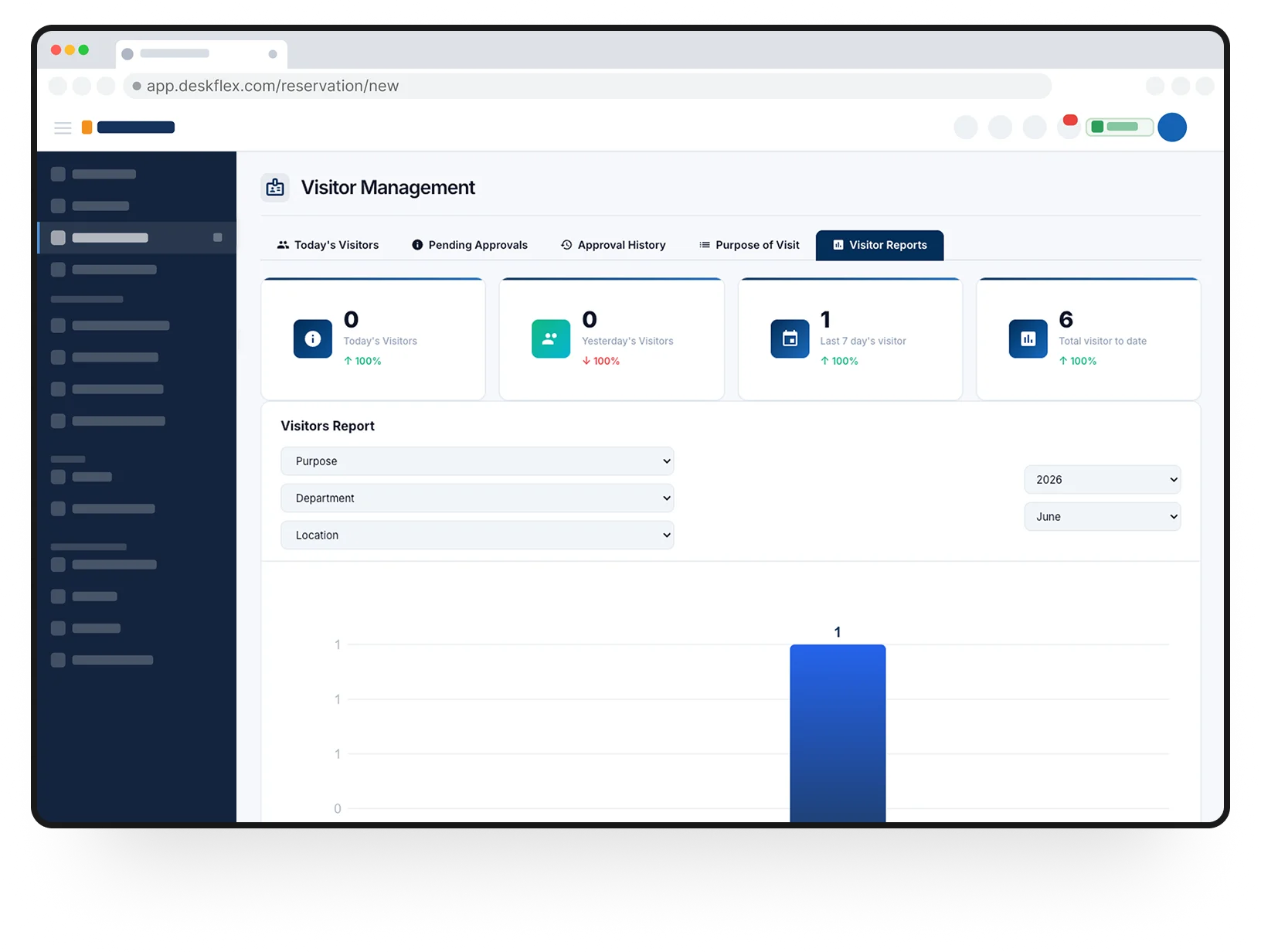
Real-Time Tracking & Access Control
Badges with embedded codes or RFID chips log entry through controlled doors. Security dashboards show current building occupancy, visitor locations, and dwell times. If a visitor attempts to enter an unauthorized floor, the system denies access and logs the attempt. Integration with door hardware happens through standard protocols—no proprietary lock systems required.
Auto Check-Out & Compliance Logging
Visitors check out by badge return, kiosk scan, or automatic timeout. The system finalizes the visit record with complete entry and exit timestamps. Compliance reports generate instantly for auditor requests. Data retention policies automatically purge records after the required period, reducing GDPR and HIPAA exposure.
How to Implement Outlook Visitor Management
Connect to Exchange/Outlook
IT administers grant DeskFlex read/write calendar permissions through standard Microsoft Graph API or Exchange Web Services. No on-premise software installation is required for cloud-hosted Exchange. For hybrid environments, a lightweight connector bridges on-premise servers. Typical setup time: one to two hours.
Configure Pilot Department
Select one department or building to validate workflows. Define visitor types, required fields, badge formats, and security rules. Train a small group of hosts and reception staff. Run parallel with existing processes for one week to validate accuracy, then switch over fully.
Link Access Control & Badge Systems
Integrate existing badge printers, card readers, and door controllers. DeskFlex supports standard Wiegand and OSDP protocols for hardware communication. Badge templates are designed in the interface and sent to local or network printers. Test with a few doors before full deployment.
Enable Compliance Reporting
Configure automated report schedules—daily security summaries, weekly occupancy analytics, monthly compliance packages. Set data retention rules aligned to regulatory requirements. Assign role-based access so only compliance officers can export full audit trails, while reception sees only daily visitor lists.
From Calendar Booking to Secure Visitor Management
Outlook handles scheduling. DeskFlex handles everything that happens after the calendar invite is sent—identity verification, physical access, real-time tracking, and compliance documentation. The integration preserves the workflow your organization already uses while closing the security and operational gaps that generic scheduling tools leave open.
For organizations where an unauthorized visitor represents significant financial, regulatory, or reputational risk, this integration shifts visitor management from administrative convenience to strategic security infrastructure
Modern visitor management requires more than calendar scheduling alone. DeskFlex connects Outlook with secure visitor check-ins, identity verification, badge management, compliance tracking, and workplace access control within one streamlined workflow. Ready to see how Outlook integrated visitor management works in your environment?
Frequently Asked Questions (FAQs)
Can visitors book without pre-registration?
Yes. Walk-in visitors check in at reception and provide required information on arrival. Pre-registered visitors move through faster with pre-printed badges or express kiosk check-in.
What happens if someone arrives with no appointment?
The system flags the absence of a matching Outlook calendar entry. Reception verifies with the host, performs additional ID checks, or escalates to security based on your configured rules.
Do hosts need to use a separate interface?
No. Hosts continue using Outlook normally. DeskFlex reads calendar events and sends notifications through familiar channels—email, calendar alerts, or Teams messages.
Can contractors set up recurring visits?
Yes. DeskFlex recognizes Outlook recurring appointments and applies the same security and compliance rules to each instance. Individual occurrences can be modified independently.
Does this work with Microsoft Teams?
Yes. Teams meeting links embed automatically in visitor confirmations. Remote attendees and in-person visitors receive unified communications.
How is GDPR compliance handled?
Explicit consent is captured at booking. EU data residency is available. Privacy notices display at check-in. Deletion requests execute automatically per configured retention policies.
What security information is collected?
Only what your policy requires: typically name, company, purpose, emergency contact, and government ID. Avoid collecting unnecessary data like home addresses or Social Security numbers.
Can different departments have different rules?
Yes. Executive floors may require pre-approval. Sales areas can allow open booking. Finance and legal may mandate NDA signatures. Each department configures independently.


Support
Demo
Blog
Newsroom