Long queues, paper logbooks, and overworked reception staff are no longer tolerated in the contemporary workplace. Visitors’ first point of contact (and the point of frustration) with your hospital or corporate office, or with your multi-property facility, is your front desk.
The front desk check-in software has eliminated manual front desk operations by providing a digital solution that automates visitor management. It enhances security and delivers a smooth, professional check-in experience to guests upon arrival.
This article will dive into the nitty-gritty of front desk check-in software that shortens wait times and enhances visitor experience.
What is Front Desk Check-In Software?
A front desk check-in software is an online platform that enables visitors, guests, and employees to check in using self-service kiosks, tablets, and mobile devices. Visitors complete a secure online check-in that records vital information in real time, rather than signing paper logbooks.
This kind of front desk computer software is usually an automated visitor management system. It consolidates guest information, enforces access control policies, and provides a live dashboard that allows reception and facility staff to see who is present in the facility at any given time.
The Process of Digital Front Desk Check-In
Companies that have adopted digital visitor management often note that wait time is shortened, visitor satisfaction is increased, and the administrative workload is minimized.
The self-service check-in reduces bottlenecks during the busy season, and automated workflows minimize human error.
1. Visitor Pre-Registration
They provide visitors with a pre-registration link or QR code before arrival. This allows them to feed the required information before they reach the front desk to check in, thus they do not waste much time.
2. Contactless On-Site Check-In
Tourists are invited to check in via a touchless kiosk mode, tablet, or mobile phone. This generates a quick, non-contact, and convenient experience.
3. Automated Host Notification
After check-in, the system will automatically notify the host of a visitor’s arrival. This eliminates the manual follow-up by front office staff.
4. Rule Enforcement and Access Control
The system has a badge-printing policy, a meeting room booking policy, and role-based access control with predefined rules. This automatically ensures that visitors follow the security and access policies.
5. Cloud-Based Data Storage Security
All visitors’ records and statistics are securely stored in the cloud. This eliminates the need to maintain records manually and promotes compliance, reporting, and checks.
Why Organizations are Abandoning Manual Reception Desks?

Front office operations are manual and waste time, as well as subject individuals to unreasonable risk. Paper guest logs are hard to check, easy to lose, and don’t provide much insight into real-time usage.
On the other hand, the digital front desk check-in software is designed to automate front desk operations, enhance workplace compliance and accuracy, and increase staff productivity.
Reception staff do not have to waste time on redundant actions; they should focus on providing a warm welcome to visitors to the firm.
Features of a Modern Front-Desk Software
Today’s front-desk software goes beyond basic check-in. It delivers smart features that enhance visitor experience, strengthen security, and reduce front desk workload.
Self-Service Check-In and Touchless Check-In
Contactless check-in systems minimize physical contact and shorten the check-in time. Self-service digital kiosk systems enable visitors to check in themselves, particularly in high-traffic areas such as hospitals and corporate offices. This provides customers, visitors, or clients with a comfortable stay and efficient service.
Visitor Management Real-time Dashboard
A centralized dashboard provides management of reception and the facility, with a real-time view of visitors, guests, and contractors on-site. This real-time knowledge is used in contingency plans concerning safety and room in case of a calamity.
Safe Visitor Records and Control Measures.
New approaches to visitor management take safety and regulations into account. Today, front desk software may include features such as secure data storage, audit trails, and role-based access control, which help keep confidential information secure and ensure that all rules are followed.
Interaction at the Workplace
Systems that may schedule conference rooms, manage entry, and operate the workplace may include software that enables people to check in at the front desk. This creates a cohesive workflow in which visitor flow automatically grants access to rooms, triggers notifications, and requires other security approvals.
Industries that Benefit from Front Desk Check-In Software
Front desk check-in software is used in a variety of industries because it improves the flow of people, security, and efficiency in the organization. It helps organizations handle guests professionally and meet a number of requirements, including space and staffing requirements.
Hospitals and Health Care Centers
Since then, digital visitor management has been adopted in healthcare environments to reduce congestion at reception desks and ensure high security levels are maintained. Touchless check-in service helps control infection and enhances the patient and guest experience during high-stress visits. The visitor logs are also beneficial to healthcare administrators, as they facilitate compliance and safety audits without imposing an administrative burden.
Corporate Offices and Hybrid Workplaces
For corporate teams, front desk check-in software supports flexible working environments and hybrid schedules. Visitors, vendors, and employees will be able to check in quickly without using the manual check-in process. The outcome would be more efficient staff work, the ability to monitor office use, and a more professional attitude towards clients and partners at first sight.
Facilities Manager and Property Managers
Keep Exploring
More guides on workplace management, desk booking, and hybrid work.
Property and building managers are responsible for many properties, renters, and types of guests. The digital front desk system enables all sites to treat visitors consistently and consolidates all details on a single screen. This level of transparency assists managers in simplifying operations, implementing safety measures, and enhancing the overall guest experience across all locations.
Hotels and Other Places Where People Stay
Front desk check-in software is front desk software used in hospitality settings that works with hotel management software to make it easier for guests to check in. Digital check-in reduces wait times, enhances self-service, and frees up staff to focus on providing more personalized service.
The Role of Front Desk Check-In Software in Security Management
Security is no longer about security guards or sign-in sheets. The current visitor management system is an automatic access control system that allows only visitors-in to access authorized areas. Real-time visitor tracking, secure information storage, and audit trails will provide security and compliance teams with accountability and peace of mind.
Eliminating the Manual Process of Security
Badge logs and Sign-in sheets, which are conventional security measures, are no longer applicable in modern workplaces. Such paper-based processes can easily be error-ridden, misplaced, and accessed without authorization. Visitor management systems introduce new technologies, replacing outdated, less secure, and more time-consuming systems.
Automated Access Control to Authorized Access
Contemporary visitor management systems are computerized access control systems that allow only approved visitors to enter a given area. Access permissions can be configured in advance, minimizing the risk of unauthorized movement within the facility. This ensures that visitors visit only where they are expected.
Visitor Monitoring and Tracking in Real Time
This will benefit security officers, as they will be aware of who is inside the building at any given time through constant surveillance. It will help in tracking visitor movement, on-time arrivals, and departure status in real time. This ease of access improves response time in the event of an emergency or security incident.
Safe Visitor Data Archiving and Privacy
In particular, visitor information is stored in a secure, computerized system rather than on paper. It will reduce the risk of data loss, breaches, or unauthorized access. Secure storage also meets the data privacy and security standards.
Compliance and Accountability Audit Logs
Audit logs provide a comprehensive history of visitor activity, including the time of check-in, the location of the visit, and the time of check-out. These are logs that assist compliance and security teams in viewing the past visits as required. They also offer clear accountability of audits, investigations, or regulatory requirements.
How to Select the Right Front Desk Check-in Software for Your Business?
The factors organizations must consider when selecting front desk check-in software include ease of installation, customization, and scalability. When choosing front desk check-in software, organizations are advised to pay attention to critical aspects like:
Ease of Installation
One of the great things about check-in software at the front desk is that it is easy to implement. It does not require much IT intervention or time. Businesses can be up and running faster with cloud-based solutions that provide guided onboarding, require minimal hardware, and offer concise documentation.
Customization
Each organization has its own workflows, branding needs, and compliance requirements. The check-in system should also be reliable and capable of customizing registration forms, visitor badges, notifications, access permissions, and branding elements.
Scalability
As businesses expand, visitor management requirements change. The proper system must be able to expand easily from a single location to multiple locations without performance problems. Scalability enables managing growth in visit traffic, new users, new features, and integrations without slowing down, degrading, or compromising the platform’s speed, reliability, and security.
Technical Capability
When selecting the right front desk check-in for your business, it is crucial to consider its Technical capability. It defines the level of integration between the system and current workplace solutions, such as access control systems, calendar systems, security software, and Human Resource databases. A comprehensive technical foundation is essential for long-term efficiency, data security, and business continuity.
Choose DeskFlex Front Desk Check-In Software to Improve Visitor Experience
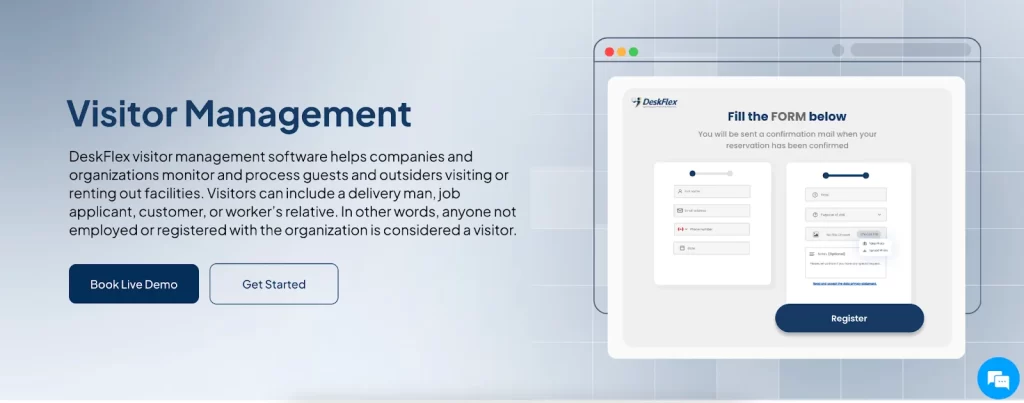
Looking to transform your front desk into a smooth, professional, and efficient welcome point? DeskFlex Front Desk Check-In Software makes it effortless. Designed for modern workplaces, hospitals, hotels, and multi-property facilities, DeskFlex eliminates long queues, manual logbooks, and administrative bottlenecks. Your visitors can check in quickly via self-service kiosks, tablets, or mobile devices—giving them a seamless, touchless, and hassle-free experience from the moment they arrive.
Why DeskFlex Stands Out:
Self-Service & Touchless Check-In: Let visitors check in themselves, reducing wait times and ensuring safety.
Real-Time Visitor Dashboard: Monitor guests, contractors, and employees across locations in real time.
Automated Host Notifications: Hosts are instantly informed when their visitors arrive.
Secure Cloud-Based Storage: Keep visitor data safe, compliant, and easily accessible.
Rule-Based Access & Badge Management: Control who can access specific areas for added security.
Conclusion
Front desk check-in software is no longer a luxury but a must-have for organizations focused on efficiency, security, and visitor experience. Digital front desk solutions reduce wait times, automate reception processes, and provide real-time visibility, enabling teams to be smarter and safer.
Any way you look at it, a modern front desk check-in system is an excellent step in the right direction to improve operations and make a better first impression, whether in a hospital, corporate office, or property portfolio. Modernize your front desk today and turn wait time into welcome time by switching to a digital front desk solution built for security, speed, and scale.c