DeskFlex

Want to see DeskFlex in action? Book your live demo today!

Blog

What Is an Office Map Types, Benefits & Layout Ideas

What Is an Office Map? Types, Benefits & Layout Ideas

Modern workplaces continue to evolve, making office design a critical factor in productivity and employee satisfaction. A well structured office map helps organizations create better workflows, improve collaboration, and use space more efficiently.

Many companies still struggle with inefficient layouts that waste space and reduce employee performance during daily operations. Without a clear structure, employees spend unnecessary time navigating the office instead of focusing on meaningful work.

This is why having a well planned office map has become essential for creating a productive and organized workplace environment. It not only improves navigation but also supports better decision making when designing and optimizing office layouts.

In this guide, you will learn what an office map is, explore its different types and benefits, and discover practical layout ideas to maximize efficiency.

What Is an Office Map?

An office map is a visual representation of a workplace layout that shows how space and resources are organized. It helps employees locate desks, meeting rooms, equipment, and other facilities within the office environment easily.

Office maps are especially important in hybrid workplaces where employees frequently switch between remote and onsite work schedules. They provide clarity and structure, allowing teams to navigate the workspace without confusion or unnecessary delays. Digital office maps also include interactive features that allow users to view real time availability of spaces and resources.

Benefits of Office Maps

benefits of office map

Office maps offer a wide range of benefits that directly improve workplace efficiency, employee experience, and overall productivity. They provide structure and clarity, helping organizations manage their space more effectively while supporting daily operations.

1. Improved Navigation

One of the most immediate benefits of an office map is easier navigation across the workplace. Employees can quickly locate meeting rooms, workstations, and shared facilities without wasting time searching or asking for directions. This is especially valuable in large offices or hybrid environments where employees may not be familiar with the layout. As a result, teams can focus more on their work instead of dealing with confusion or delays.

2. Better Space Utilization

Office maps help organizations understand how their space is being used on a daily basis. They make it easier to identify underutilized areas, overcrowded zones, and inefficient layouts that need improvement. With these insights, businesses can reorganize their workspace to ensure every area serves a clear purpose. This leads to better use of available space and reduces unnecessary costs related to unused or poorly planned areas.

3. Enhanced Collaboration

A well designed office map makes it easier for employees to find their teammates and work together effectively. Teams can quickly locate each other or book nearby meeting spaces, which improves communication and coordination. This is particularly important in flexible workplaces where employees do not have fixed seating arrangements. By removing barriers to interaction, office maps help create a more connected and collaborative work environment.

4. Real Time Visibility

Modern interactive office maps provide real time updates on desk availability, meeting rooms, and shared resources. Employees can instantly see which spaces are free and make reservations without confusion or scheduling conflicts. This level of visibility helps reduce double bookings and ensures that resources are used efficiently throughout the day. It also supports better planning for both employees and facility managers.

5. Improved Employee Experience

A clear and organized workplace has a direct impact on employee satisfaction and overall experience. Office maps reduce frustration by making it easier to navigate the office and access the resources employees need. When employees feel comfortable and supported in their environment, they are more likely to stay productive and engaged. This ultimately contributes to a more positive workplace culture and better long term performance.

Types of Office Maps

Different types of office maps are designed to serve specific purposes based on the size, structure, and needs of a workplace. Choosing the right type of map helps organizations improve navigation, manage resources, and create a more efficient environment.

1. Facilities Maps

Facilities maps provide detailed information about essential amenities and shared spaces within the office. These maps highlight locations such as restrooms, break areas, cafeterias, vending machines, and other common facilities. They are especially useful for new employees and visitors who need to quickly understand where important services are located. By clearly identifying these areas, facilities maps improve convenience and reduce confusion across the workplace.

2. Floor Plans

Floor plans present a simplified view of the office layout, showing how different areas are arranged. They typically include workstations, departments, meeting rooms, and frequently used spaces within the organization. This type of map helps employees understand the overall structure of the office and how different teams are positioned. It also supports better planning when making changes to the layout or expanding the workspace.

3. Interactive Maps

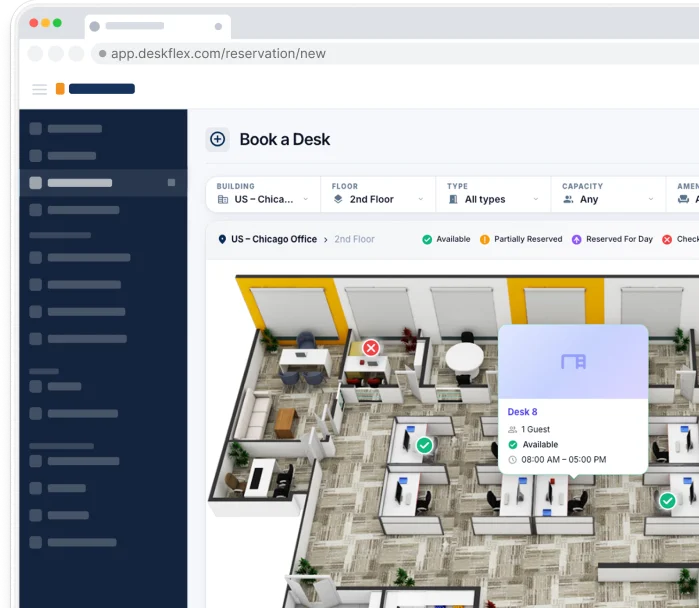
Interactive maps offer a digital and dynamic way to explore the workplace environment. Users can click on different areas to access additional details such as room availability, employee locations, or equipment information. These maps are highly useful in modern workplaces where flexibility and real time information are important. They enhance user experience by making navigation more intuitive and efficient.

4. 3D Maps

3D maps provide a realistic representation of the office, allowing users to visualize the space more clearly. They simulate how the workplace looks in real life, including depth, spacing, and arrangement of furniture. This makes it easier for employees and managers to understand how different areas are connected. 3D maps are also valuable when planning new layouts or redesigning existing spaces.

5. Seating Charts

Seating charts focus on showing where employees are assigned within the office. They help users identify team members, understand team structures, and locate specific individuals. This is particularly useful in organizations with flexible seating or large teams spread across different departments. Seating charts improve communication by making it easier for employees to find and connect with each other.

Key Features of an Effective Office Map

A well designed office map includes features that enhance usability, improve accuracy, and support daily workplace operations. These features ensure that employees can easily navigate the office while organizations gain better control over their space.

1. Real Time Updates

An effective office map should always reflect the current status of the workplace environment. This includes real time availability of desks, meeting rooms, and shared resources across the office. Employees can quickly check which spaces are free and make decisions without delays or confusion. This helps reduce scheduling conflicts and ensures that resources are used efficiently throughout the day.

2. Search and Navigation

A strong search and navigation system is essential for helping users find what they need and without effort. Employees should be able to locate colleagues, meeting rooms, or equipment using simple search functions. Clear navigation tools guide users through the office layout, making movement faster and more efficient. This is particularly useful in large or complex workplaces where manual searching can waste valuable time.

3. Clear Visual Design

A clean and well organized visual design makes an office map easy to understand at a glance. Using consistent symbols, readable fonts, and proper spacing ensures that information is clear and accessible. Simple layouts with clear labels prevent confusion and help users quickly interpret the map. This improves overall usability and creates a smoother experience for everyone in the workplace.

4. Data Tracking

Data tracking allows organizations to collect valuable insights about how office space is being used. This includes information on desk occupancy, meeting room usage, and traffic patterns within the office. By analyzing this data, businesses can identify inefficiencies and make informed decisions about layout improvements. This leads to better space planning, cost savings, and a more optimized work environment.

How to Design an Office Map Step by Step

Office Floor Layout Design

Designing an effective office map requires careful planning, thoughtful design choices, and continuous improvement based on real usage data. A structured approach ensures that your map remains accurate, user friendly, and aligned with the needs of your workplace.

1. Plan Your Layout

The first step in designing an office map is to evaluate your current workspace and overall layout. Identify areas that are underutilized, overcrowded, or poorly organized to understand where improvements are needed. You should also consider team workflows, department placement, and how employees move within the office daily. A well planned layout creates the foundation for a map that supports efficiency and productivity.

2. Use Clear Visual Elements

Clarity is essential when creating an office map that employees can easily understand and use. Simple labels, consistent icons, and readable text help users quickly identify different areas and resources. Avoid adding unnecessary details that may clutter the map and make navigation more difficult. A clean and organized visual structure ensures that users can interpret the map without confusion.

3. Focus on Accessibility

An effective office map should be designed to accommodate the needs of all users within the workplace. This includes using clear color contrasts, readable font sizes, and simple layouts that improve visibility. Accessibility ensures that every employee can navigate the office comfortably regardless of their individual needs. It also reflects a more inclusive and thoughtful approach to workplace design.

4. Test and Improve

Once your office map is created, it is important to test it in real workplace conditions. Gather feedback from employees across different teams to understand how well the map performs in daily use. Use this feedback to make adjustments and improve accuracy, usability, and overall effectiveness. Regular updates ensure that your office map continues to meet changing workplace needs over time.

Office Layout Ideas to Maximize Space

Optimizing your office layout is essential for improving efficiency, reducing wasted space, and creating a more flexible work environment. A well planned layout allows organizations to adapt to changing needs while supporting both individual and team productivity.

1. Conduct a Space Audit

The first step toward optimizing your office layout is understanding how your current space is being used. Carefully analyze different areas to identify underutilized spaces, overcrowded zones, and inefficient arrangements. Look at how often desks, meeting rooms, and shared areas are occupied during the day. This data helps you make informed decisions about which areas need improvement or better organization.

2. Create Multipurpose Areas

Designing multipurpose spaces allows you to get more value from the same amount of office space. These areas can be used for meetings, focused work, brainstorming sessions, or informal collaboration. Flexible furniture and adaptable layouts make it easier to switch between different uses when needed. This approach not only saves space but also supports different work styles within the organization.

3. Support Hybrid Work

Hybrid work models help reduce the need for permanent desks and large dedicated office spaces. By allowing employees to work remotely when needed, organizations can optimize how space is allocated. This makes it possible to create shared work areas instead of assigning fixed seating to every employee. As a result, businesses can reduce costs while maintaining flexibility and productivity.

4. Involve Your Team

Employees interact with the workspace daily, so their input is valuable when improving office layout. Collect feedback through surveys, discussions, or informal conversations to understand their needs and challenges. This helps identify real issues that may not be visible through data alone. Involving your team ensures that changes are practical, effective, and aligned with how people actually work.

How to Create an Office Map Using Tools and Software

How to Create an Office Map Using Tools and Software

Creating an office map manually can be time consuming and may lead to errors or outdated information. Modern digital tools provide a faster, more accurate, and efficient way to design and manage office layouts.

1. Use Workplace Management Software

Workplace management software allows you to create interactive office maps that reflect real time conditions. These maps can show desk availability, meeting room occupancy, and other shared resources across the workplace. Digital tools often include features such as clickable elements, zooming, and real time updates to enhance usability. They provide a clear and accurate view of the office for both employees and facility managers.

2. Integrate with Desk Booking Systems

Many office mapping tools integrate seamlessly with desk booking or scheduling systems. This makes it easier for employees to reserve workspaces or meeting rooms without conflicts or confusion. Integration ensures that the map always reflects current usage and helps streamline daily operations. It also reduces scheduling errors and maximizes the efficiency of available resources.

3. Improve Accuracy and Efficiency

Using digital solutions improves the accuracy of your office map compared to manual drawings or static images. It saves time by allowing updates to be made quickly and automatically when changes occur in the office layout. Additionally, these tools provide valuable insights into how space is being used, helping organizations optimize layouts. Data driven decisions based on accurate maps lead to better resource management and a more productive workplace.

Try Deskflex’s 3D Floor Map

If you want to experience the full potential of office mapping, Deskflex offers an interactive 3D floor map. It allows employees to view desk availability, meeting rooms, and other resources in real time. You can explore different layouts, test new seating arrangements, and optimize your office space effortlessly. With Deskflex, creating an organized, efficient, and employee friendly workspace becomes simple and intuitive.

Start using Deskflex’s 3D floor map today and see how it can transform your workplace experience.

Frequently Asked Questions (FAQs)

An office layout refers to the arrangement of furniture, equipment, and workspaces within a workplace. It determines how employees move, collaborate, and interact within the office environment.

A layout is the physical organization of the office, including desks, meeting rooms, and common areas. A map is a visual representation of that layout, often digital or interactive, to help employees navigate the space.

A well designed office layout improves workflow, reduces distractions, and allows employees to complete tasks more efficiently. It also enhances communication and collaboration between teams by organizing spaces thoughtfully.

You can create an office map using digital tools or workplace management software that allows interactive mapping. These tools make it easy to design, update, and manage your office layout in real time.

Interactive office maps provide real time information on desk availability, meeting rooms, and shared resources. They simplify navigation, prevent scheduling conflicts, and improve overall workplace efficiency.