


Blog
How to Create and Implement Office Seating Chart?
Office seating charts have evolved far beyond simple floor plans with employee names. They now play a central role in workplace organization and efficiency. Recent workplace studies show that companies using structured space planning improve office utilization by up to thirty percent. Clear visibility into seating arrangements also reduces time wasted searching for colleagues or available desks.
A well-designed seating chart helps employees locate teammates quickly, encourages collaboration, and supports higher overall productivity. Research indicates that employees spend nearly twenty percent of their time looking for information or coworkers in poorly organized offices.
In hybrid environments, where attendance shifts daily, flexible seating arrangements require clear visibility across floors, departments, and work zones. Without structured seating planning, confusion and underused space quickly become common problems.
This guide will walk you through what office seating charts are, why they matter in modern workplaces, the different arrangement types available, and practical planning and implementation strategies.
What is an office seating chart?
An office seating chart is a structured visual map that shows where employees are located within a workplace. It outlines fixed desks, shared workstations, team neighborhoods, meeting areas, and collaborative zones across the office.
Unlike traditional static layouts, modern seating charts are dynamic and adaptable to changing workplace needs. They can reflect real time desk availability, department groupings, and flexible seating arrangements in hybrid environments.
For managers, a seating chart provides clarity when planning team placement, departmental shifts, or space adjustments. For employees, it reduces confusion, saves time, and makes it easier to locate colleagues quickly.
Seating charts also support better collaboration planning, health and safety considerations, and smarter workspace optimization. In today’s flexible offices, a seating chart acts as both a planning tool and a daily navigation guide for teams.
Why Office Seating Charts Matter in Modern Workplaces?
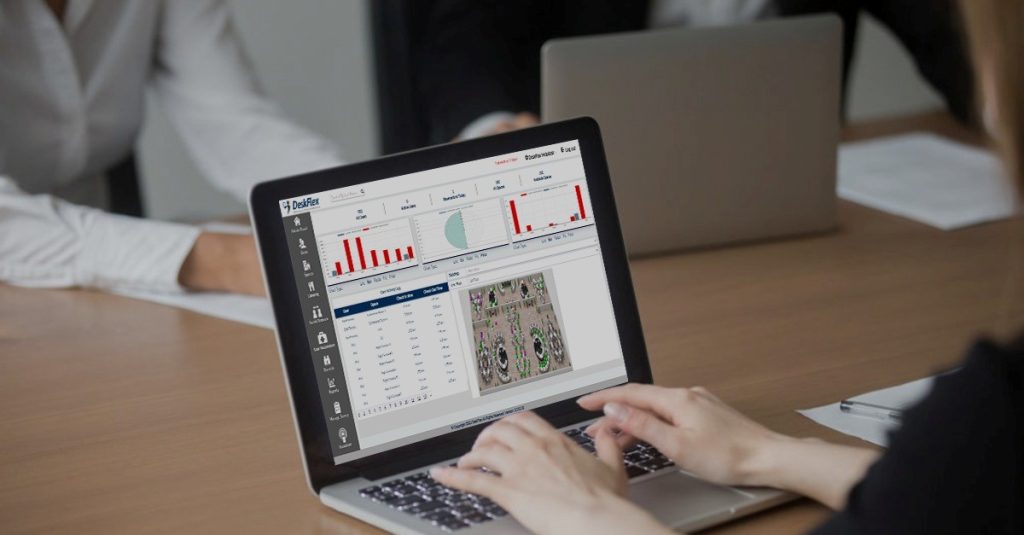
Office seating charts influence productivity, employee satisfaction, and operational efficiency across the entire organization.
In today’s flexible work environments, visibility and structure are essential for maintaining order and collaboration.
1. Improve Space Utilization
A seating chart helps identify underused desks, empty zones, and inefficiently arranged collaboration areas. By reviewing how space is actually used, organizations can redesign layouts to accommodate employees more effectively. Better office space planning reduces wasted square footage and ensures every workstation supports business goals. Optimized layouts also prevent overcrowding while maintaining comfort and accessibility throughout the office.
2. Enhance Employee Experience
Employees benefit from clearly knowing where teammates and shared resources are located. A structured seating map reduces time spent searching for colleagues or available workspaces. When people can navigate the office confidently, they experience less frustration and greater daily efficiency. Clear seating organization fosters a professional environment that feels intentional and well managed.
3. Support Collaboration and Focus
Seating charts make it easier to position teams that collaborate frequently near each other. At the same time, they allow for designated quiet zones where employees can focus without interruptions. Thoughtful placement encourages cross functional communication while protecting deep work time. This balance strengthens teamwork without sacrificing individual productivity.
4. Enable Flexibility for Hybrid Work
Modern workplaces often operate with rotating schedules and varying in office attendance. Dynamic seating charts allow organizations to adapt layouts quickly as team presence changes. Employees can select desks that align with their schedules and daily responsibilities. Flexible seating structures ensure smooth coordination across departments and working styles.
5. Simplify Operational Changes
Office moves, team expansions, and departmental shifts are inevitable as organizations grow. A seating chart provides a clear visual reference that simplifies planning and execution. Managers can implement updates with minimal disruption to employees and ongoing projects. Clear documentation of seating arrangements ensures changes are communicated effectively and applied consistently.
Types of Office Seating Arrangements

Different seating arrangements are designed to support specific workflows, team dynamics, and organizational structures.
Choosing the right model depends on company size, work style, collaboration needs, and available office space.
1. Assigned Seating
Assigned seating provides each employee with a permanent desk or workstation. This arrangement creates stability, encourages personalization, and supports roles that require consistent equipment or privacy. It works well in traditional office environments where employees work on site daily.
2. Hot Desking
Hot desking allows employees to choose any available desk when they arrive at the office. This flexible model supports hybrid schedules and reduces the number of unused workstations. It is ideal for organizations where employees rotate between remote and in office work.
3. Hybrid Seating Models
Hybrid seating combines dedicated desks with shared or flexible workspaces. Some employees may have assigned desks, while others use bookable shared areas. This model balances stability with flexibility and adapts well to evolving workplace needs.
4. Activity Based Seating
Activity based seating organizes the office around different types of work rather than fixed roles. Quiet zones support focused tasks, while collaboration areas encourage teamwork and brainstorming. This approach allows employees to choose a space that best matches their daily responsibilities.
5. Team Based Neighborhoods
Team based neighborhoods group departments or functional teams within designated areas. This setup strengthens communication, speeds up collaboration, and creates a sense of belonging within teams. It also makes it easier to manage shared resources and maintain clear organizational structure.
6. Flexible or Free Address Seating
Flexible seating removes permanent desk ownership entirely and emphasizes shared workspace use. Employees select workstations based on availability and daily needs, maximizing space efficiency. This model works well for highly mobile teams or organizations prioritizing adaptability.
How to Create an Office Seating Arrangement?

Creating an effective office seating arrangement requires thoughtful planning and a clear understanding of workplace dynamics. A well structured layout aligns with team workflows, available space, and long term organizational goals. When done correctly, seating arrangements improve empolyee productivity, collaboration, and employee satisfaction across the office.
1. Assess Your Work Model
Start by identifying whether your organization operates as hybrid, office first, or fully flexible. Work models directly influence how many desks are needed and how frequently they will be used. Understanding attendance patterns helps determine whether assigned seating or shared desks are more suitable.
2. Understand Team Workflows
Analyze how departments interact and which teams collaborate on a regular basis. Place frequently collaborating teams closer together to encourage smoother communication and faster decision making. At the same time, identify roles that require privacy or focused environments to minimize distractions.
3. Balance Collaboration and Focus
An effective seating arrangement supports teamwork without sacrificing individual productivity. Design collaboration zones for group discussions while maintaining quiet spaces for deep concentration. This balance ensures employees can choose environments that match their daily responsibilities.
4. Consider Space Limitations
Measure your available office space carefully before finalizing desk placements. Account for walkways, meeting rooms, shared equipment areas, and accessibility requirements. Smart space planning prevents overcrowding and keeps the office comfortable and functional.
5. Plan for Future Growth
Anticipate hiring plans, department restructuring, and potential office expansion. Leaving flexible areas within your layout prevents constant rearrangement as the organization evolves. A scalable seating arrangement saves time, reduces disruption, and supports sustainable workplace growth.
How to Implement an Office Seating Chart Successfully?
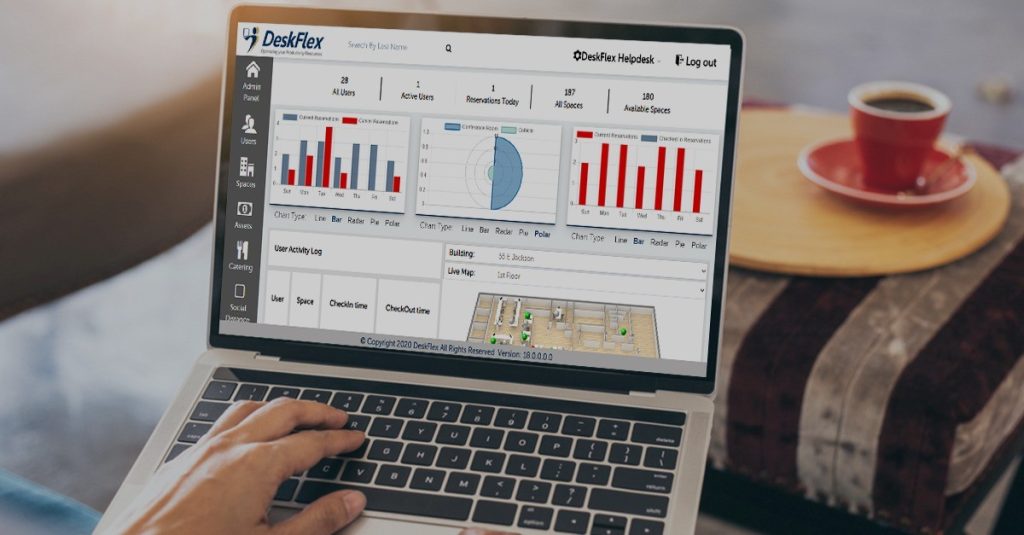
Implementing an office seating chart requires careful coordination, clear communication, and consistent follow through. A structured rollout ensures employees understand the system and feel confident using the new office layout. Successful implementation transforms planning into practical results that improve daily workplace operations.
1. Map Your Current Layout
Begin by documenting every desk, meeting room, and shared workspace within the office. Create a clear 3d visual map of your current layout to identify gaps and opportunities. Accurate mapping reduces errors and ensures no space is overlooked during implementation.
2. Define Seating Rules
Establish clear policies for assigned desks, shared workstations, and flexible seating areas. Define team zones, priority access, and any booking procedures employees must follow. Clear rules create fairness, prevent confusion, and support consistent workspace usage.
3. Communicate the Plan
Share updated seating maps and detailed guidelines with all employees before rollout. Explain the purpose behind the changes to build understanding and cooperation. Transparent communication reduces resistance and helps employees adapt more quickly.
4. Roll Out in Phases
Introduce the seating chart gradually by starting with one department or pilot group. Use this trial period to identify challenges and gather early feedback from participants. A phased rollout minimizes disruption and allows improvements before full scale implementation.
5. Monitor and Adjust
Track how spaces are used and collect regular feedback from employees and managers. Identify overcrowded zones or underutilized areas and refine the layout accordingly. Continuous evaluation ensures the seating chart remains aligned with evolving team needs and workplace goals.
Streamline Office Seating Arrangements Using DeskFlex
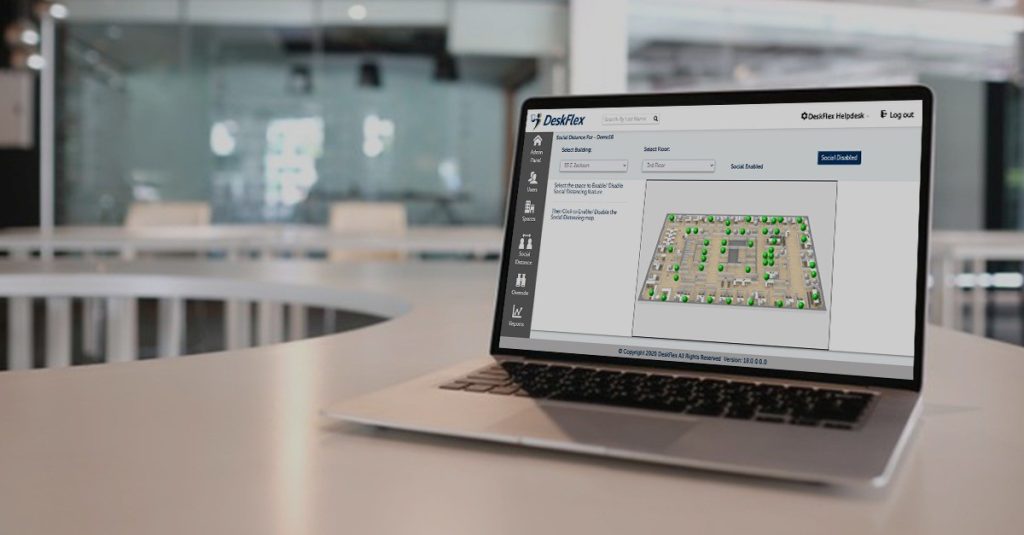
Managing office seating manually often creates confusion, underutilized desks, and limited visibility into workspace usage. DeskFlex simplifies the entire process through a centralized platform that combines desk booking, real time tracking, and interactive seating management tools. Organizations can create digital layouts using a dynamic 3D floor map that gives a complete visual overview of desks, rooms, and collaboration areas. This clear visibility helps managers assign workstations efficiently and monitor attendance patterns without operational complexity.
The integrated desk booking system allows employees to reserve available workstations in advance based on schedules and team needs. With the 3D floor view, employees can easily locate coworkers and select spaces that match their daily tasks. Detailed space usage analytics provide insights that help optimize layouts and reduce wasted square footage. DeskFlex supports hybrid and flexible seating models, enabling businesses to adapt quickly as teams grow or restructure.
Book your free demo today and discover how DeskFlex can transform your office seating strategy with smarter space management.
Frequently Asked Questions (FAQs)
1. What is an office seating chart?
An office seating chart is simply a visual map of your desks, rooms, and people. However, today, it’s much more than a static diagram, as modern seating charts are interactive and display real-time desk availability and bookings through innovative software and an intuitive desk reservation system.
2. Why do companies need office seating charts?
They maximize space, simplify wayfinding, and support collaboration. Dynamic seating plans enhance desk management and keep the office organized. On top of that, they also accommodate hybrid schedules.
3. How does DeskFlex improve seating chart management?
DeskFlex combines mapping, scheduling, and analytics. Its workplace scheduling software syncs with your calendars and HR systems, and the interactive seating chart, along with rules-based desk reservations, keeps everything accurate and actionable.
4. Can seating charts support hybrid workplaces?
Definitely! With hot desking software and a hybrid office seating plan, you can mix assigned seating and shared pools, all governed by your seating chart system.
5. Are office seating charts customizable?
Absolutely, set up neighborhoods based on how your teams work, add activity zones, and fine-tune desk setups in minutes with easy online seating chart tools.
6. How do I create an office seating chart for my company?
Start with your floor plan, map neighborhoods to team structures, then roll out office seating chart software with an interactive seating chart and a desk booking system.
7. What is the best software for office seating charts?
Look for real-time booking, role-based rules, analytics, and integrations. DeskFlex unifies these with workplace management software for end-to-end governance.
8. How do seating charts improve collaboration in the office?
They bring related teams together, make it easier to find people, and align desk setups with each stage of a project across the office.
9. What’s the difference between hot desking and assigned seating?
Assigned seating guarantees a permanent desk, while hot desking utilizes desk reservation software, allowing employees to book on demand within designated pools.
10. What are the benefits of interactive seating charts over static ones?
Accurate, easy to understand, and fast. Your interactive office floor plan updates in real time across every campus, including the enterprise center seating chart.