



What is Office Automation? Implementation, Benefits & Tools
In modern workplaces, repetitive tasks slow down productivity and increase the risk of human error, especially when employees juggle multiple processes manually. Office automation offers a powerful solution by using software to digitize everyday workflows, streamline operations, and improve how teams work across departments. Around 60 percent of businesses worldwide have already implemented automation in at least one workflow, demonstrating how essential automation has become to efficient operations.
Automation also boosts employee productivity by eliminating repetitive work and reducing the time spent on low‑value tasks. According to industry research, automation improves jobs for 90 percent of knowledge workers and increases productivity for about 66 percent of them, showing how widely automation enhances work quality and speed. Companies adopting automation tools can improve employee efficiency, enhance customer experience, cut operational costs, and support hybrid work environments through seamless digital workflows. In this guide, we will explore office automation tools, key benefits, real examples, and implementation steps for businesses of all types and sizes
What is Office Automation?
Office automation is the use of software, applications, and digital systems to streamline repetitive and time-consuming tasks in a company. By automating routine processes, employees can focus on high-value work that requires creativity, decision-making, and strategic thinking. Office automation improves efficiency, reduces human error, and ensures smoother collaboration across departments. It supports faster data storage, seamless information transfer, and real-time communication, making workplaces more organized and productive.
Types of Office Automation

Office automation can be classified into two main categories: back-office automation, which focuses on internal support functions, and front-office automation, which streamlines client-facing activities. Both types work together to improve efficiency, accuracy, and collaboration across the organization.
1. Back-Office Automation
Back-office automation focuses on internal business operations that support the organization but do not directly interact with customers. This includes departments like finance, human resources, IT, and administrative support. Automation in these areas helps streamline tasks such as payroll processing, expense tracking, inventory management, and employee onboarding. By reducing manual work, back-office automation minimizes errors, saves time, and allows employees to focus on more strategic projects that improve overall operational efficiency.
2. Front-Office Automation
Front-office automation deals with client-facing activities that directly impact customer interactions and business growth. It includes areas such as sales, marketing, customer support, and service management. Today, many businesses enhance these functions with conversational ai for customer support, enabling instant, personalized responses that improve customer experience while reducing response time.Tools for front-office automation automate lead tracking, email campaigns, customer relationship management (CRM), and service ticket handling. This type of automation improves customer satisfaction by ensuring faster responses, personalized communication, and consistent service quality, while also enabling teams to focus on nurturing relationships and generating business value.Modern AI-powered automation can often be supported by an ML inference engine, which enables customer-facing applications to process requests and generate intelligent responses in real time.
How Office Automation Works?
Office automation works through a structured process where software systems capture data, process tasks, and trigger actions automatically. It connects different tools and applications to create a seamless workflow that reduces manual effort and improves workplace efficiency. Each step in the process ensures that information flows smoothly and tasks are completed without delays.
1. Data Collection and Input
The process begins with collecting data from various sources such as forms, emails, applications, or user inputs. This data can include employee information, customer details, project updates, or financial records. Automation systems capture this information digitally, eliminating the need for manual entry and reducing the chances of errors.
2. Data Storage and Organization
Once data is collected, it is stored securely in centralized systems such as cloud platforms or databases. These systems organize information in a structured format, making it easy to access, update, and share across departments. Proper data storage ensures consistency, security, and quick retrieval when needed.
3. Workflow Trigger and Processing
After storing the data, automation systems trigger predefined workflows based on specific actions or conditions. For example, submitting a request form can automatically start an approval process. The system processes tasks according to set rules, ensuring that each step is completed in the correct sequence without manual follow-ups.
4. Task Execution and Automation
Once workflows are triggered, tasks are executed automatically by the system. This can include sending notifications, assigning tasks, updating records, or generating reports. Automation ensures that repetitive tasks are handled quickly and accurately, saving time for employees.
5. Communication and Collaboration
Automation systems keep teams informed by sending real-time updates, alerts, and reminders. Employees receive notifications about task progress, approvals, or changes, which improves coordination and reduces communication gaps. This ensures that everyone stays aligned throughout the process.
6. Monitoring and Analytics
Automation tools track activities and generate performance data as tasks are completed. Managers can view dashboards and reports to monitor progress, identify inefficiencies, and measure outcomes. This data-driven visibility helps organizations make better decisions and improve workflows continuously.
7. Continuous Improvement and Optimization
The final step involves analyzing performance data to refine and optimize processes over time. Organizations can adjust workflows, improve system integrations, and enhance automation strategies based on insights. This ensures that office automation remains effective and aligned with business goals.
Benefits of Office Automation
Office automation brings measurable improvements to how organizations operate, helping teams work faster, smarter, and with greater accuracy. By reducing manual effort and streamlining workflows, businesses can create a more efficient and productive work environment that supports long-term growth.
1. Boosts Productivity
Automation eliminates repetitive and time-consuming tasks from daily workflows, allowing employees to focus on more important and strategic responsibilities. This leads to faster task completion and better overall performance across teams.
2. Reduces Errors
Manual processes often increase the chances of mistakes, especially when handling large amounts of data. Automation ensures tasks are completed consistently and accurately by following predefined rules and workflows.
3. Improves Employee Experience
When routine tasks are automated, employees can spend more time on meaningful work that requires creativity and problem-solving. This improves job satisfaction, reduces stress, and supports better employee retention.
4. Enhances Collaboration
Automation tools enable teams to communicate and collaborate in real time, regardless of their location. Shared access to documents and updates helps reduce misunderstandings and keeps everyone aligned on tasks and goals.
5. Supports Better Decision-Making
Automated systems collect and analyze data continuously, providing real-time insights through dashboards and reports. These insights help managers make informed decisions quickly and confidently.
6. Saves Costs and Optimizes Resources
Automation reduces operational inefficiencies by minimizing manual work and improving resource utilization. Businesses can lower costs related to labor, errors, and office space while maintaining high productivity levels.
7. Strengthens Security
Automation systems include built-in monitoring and security measures that help protect sensitive data. They can detect unusual activity, enforce compliance policies, and reduce the risk of data breaches.
Challenges of Office Automation
While office automation offers many benefits, implementing it successfully requires careful planning and management. Organizations may face several challenges during adoption, especially when integrating new technologies into existing workflows. Understanding these challenges helps businesses prepare better and ensure a smoother transition to automated processes.
1. High Initial Costs
Implementing office automation often requires investment in software, infrastructure, and employee training. For small and medium-sized businesses, these upfront costs can feel significant before seeing long-term returns.
2. Resistance to Change
Employees may feel uncertain or hesitant about adopting new technologies, especially if they are used to traditional ways of working. Without proper guidance and communication, this resistance can slow down the adoption process.
3. Integration with Existing Systems
Many organizations already use multiple tools and legacy systems that may not easily integrate with new automation software. Poor integration can lead to inefficiencies, data silos, and disruptions in workflows.
4. Data Security and Privacy Risks
Automation systems handle large amounts of sensitive business and customer data. Without strong security measures, organizations may face risks such as data breaches, unauthorized access, or compliance issues.
5. Training and Skill Gaps
Employees need proper training to use automation tools effectively. Lack of technical knowledge or insufficient training can reduce the effectiveness of automation and limit its potential benefits.
6. Over-Automation Risks
Automating too many processes without proper planning can reduce flexibility and create dependency on systems. Some tasks still require human judgment, and excessive automation may impact decision quality.
How to Implement Office Automation?
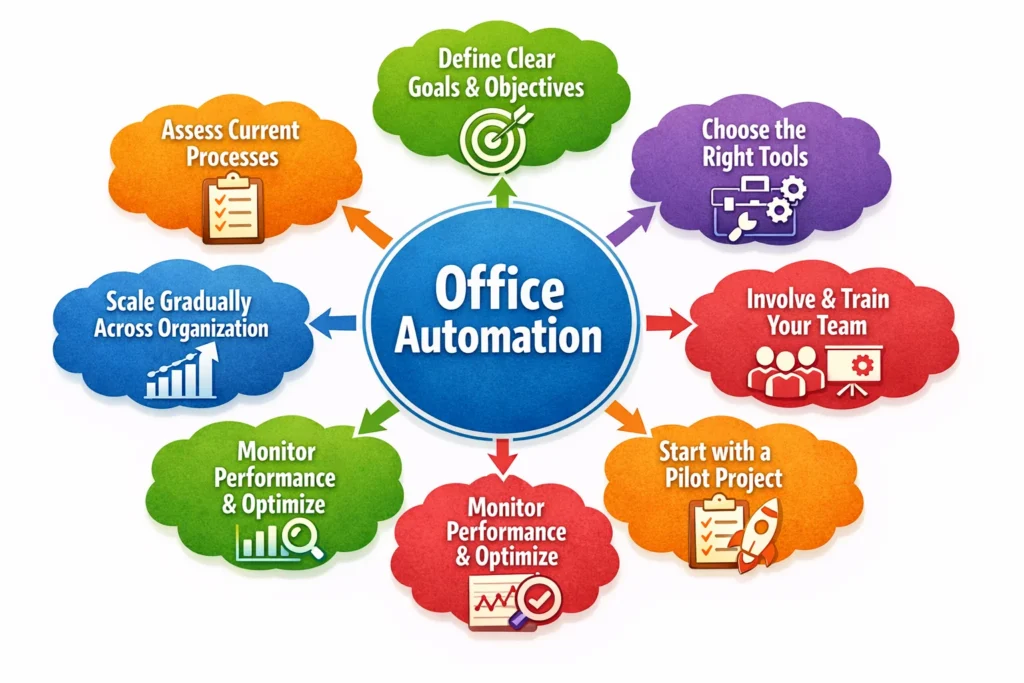
Implementing office automation requires a clear strategy, the right tools, and proper team alignment. A step-by-step approach helps organizations reduce risks, improve adoption, and achieve better results from automation initiatives. By following a structured process, businesses can ensure a smooth transition from manual workflows to automated systems.
1. Assess Current Processes
Start by reviewing existing workflows across departments to identify repetitive and time-consuming tasks. Focus on processes that involve manual data entry, frequent errors, or delays, as these are ideal candidates for automation.
2. Define Clear Goals and Objectives
Set specific goals for what you want to achieve with automation, such as improving employee efficiency, reducing errors, or enhancing collaboration. Clear objectives help measure success and guide decision-making throughout the implementation process.
3. Choose the Right Tools
Select automation tools that align with your business needs, team size, and existing systems. Ensure the tools offer scalability, integration capabilities, and user-friendly interfaces for long-term success.
4. Involve and Train Your Team
Engage employees early in the process and provide proper training to help them understand new systems. Clear communication and hands-on support increase confidence and improve adoption across the organization.
5. Start with a Pilot Project
Begin by automating one process or department to test how the system performs in a real environment. This approach allows you to identify challenges, make adjustments, and build confidence before scaling further.
6. Monitor Performance and Optimize
Track key performance indicators to evaluate the effectiveness of automation. Use data insights to refine workflows, improve efficiency, and ensure the system continues to deliver value over time.
7. Scale Gradually Across the Organization
Once the initial implementation is successful, expand automation to other processes and departments. A gradual rollout ensures better control, smoother adoption, and long-term sustainability.
Office Automation Tools for Different Departments
Office automation tools support different departments by streamlining their daily operations and reducing manual effort. Each department uses specialized tools designed to improve efficiency, accuracy, and collaboration within their specific workflows.
1. Automated Tools for Facility Management
Facility management automation tools are part of back-office operations that focus on optimizing workspace usage and maintenance processes. These tools help organizations manage office spaces efficiently, which is especially important in hybrid work environments. They enable teams to schedule maintenance, monitor space usage, and allocate resources effectively. As a result, organizations can reduce operational costs and provide a better workplace experience for employees.
Common facility management automation tools include:
- All-in-one workplace management solutions like DeskFlex
- Building automation systems like Honeywell Building
- Energy management platforms like Apollo IoT
- Visitor management systems like iLobby
- Safety and compliance tools like SafetyCulture
2. Automated Tools for Hybrid Work
Automation plays a key role in supporting hybrid work by connecting remote and in-office employees. These tools ensure smooth communication, efficient scheduling, and easy access to office resources. They help teams collaborate effectively regardless of location while maintaining productivity and flexibility. By automating scheduling and workspace management, organizations can create a seamless hybrid work experience.
Essential hybrid work automation tools include:
- Desk booking and scheduling tools like DeskFlex
- Communication platforms like Slack
- Project management tools like Notion
- Video conferencing solutions like Microsoft Teams
- Cloud collaboration platforms like Google Workspace
3. Automated Tools for Project Management
Project management automation tools help teams plan, execute, and monitor tasks more efficiently. These tools automate task assignments, deadlines, and progress tracking, ensuring that projects stay on schedule. They also provide real-time insights that help managers make better decisions and allocate resources effectively. This improves overall productivity and reduces the risk of missed deadlines.
Popular project management automation tools include:
- Task management platforms like Notion
- Gantt chart tools like Smartsheet
- Resource management software like Float
- Agile tools like JIRA
- Project portfolio management platforms like Wrike
4. Automated Tools for Human Resources
HR automation tools simplify processes such as recruitment, onboarding, payroll, and performance management. These tools reduce manual work and improve data accuracy, allowing HR teams to focus on employee engagement and development. Automation also enhances employee experience by enabling self-service options for tasks like leave requests and personal information updates.
Key HR automation tools include:
- Applicant tracking systems like Greenhouse
- Payroll software like Gusto
- Employee onboarding platforms like BambooHR
- Performance management tools like Lattice
- Employee engagement platforms like Officevibe
5. Automated Tools for Finance
Finance automation tools streamline financial operations by automating tasks such as invoicing, expense tracking, and reporting. These tools provide real-time insights into financial performance, helping organizations make informed decisions quickly. They also improve accuracy and ensure compliance with financial regulations.
Common finance automation tools include:
- Accounting software like QuickBooks
- Cloud financial platforms like Xero
- Expense management tools like Expensify
- ERP systems like Oracle NetSuite
- Accounts payable and receivable tools like Bill.com
6. Automated Tools for Security
Security automation tools protect organizational data by detecting threats and responding to risks in real time. These tools continuously monitor systems, identify vulnerabilities, and enforce security policies without manual intervention. Automation improves response time and reduces the risk of cyberattacks, ensuring a secure digital environment.
Examples of security automation tools include:
- SIEM platforms like IBM QRadar
- Intrusion detection systems like Cisco Firepower
- Endpoint detection tools like CrowdStrike Falcon
- Vulnerability management tools like Qualys
- Security automation platforms like Palo Alto Cortex
7. Automated Tools for Marketing
Marketing automation tools help teams manage campaigns, analyze data, and engage with customers more effectively. These tools automate repetitive tasks such as email marketing, social media posting, and lead tracking.Marketing automation tools can also support more effective and compliant email outreach by helping teams find anyone’s email and personalize communication at scale. As a result, marketers can focus more on strategy, creativity, and improving campaign performance.
Popular marketing automation tools include:
- Email marketing platforms like Mailchimp
- CRM systems like HubSpot
- Social media tools like Hootsuite
- Analytics platforms like Google Analytics
- Content management systems like WordPress
8. Automated Tools for Data Analytics
Data automation tools help organizations collect, process, and analyze large volumes of data efficiently. These tools generate insights through dashboards and reports, allowing teams to make data-driven decisions quickly. Automation improves accuracy and reduces the time required for manual data analysis.
Examples of data analytics automation tools include:
- Business intelligence tools like Microsoft Power BI
- Data preparation tools like Alteryx
- Statistical analysis software like JMP
- Data visualization platforms like Tableau
- Database systems like Google Cloud SQL
9. Automated Tools for Customer Relationship Management
CRM automation tools focus on improving customer interactions and managing relationships effectively. These tools centralize customer data, automate follow-ups, and track sales pipelines. By automating communication and support processes, organizations can improve customer satisfaction and increase sales efficiency.
Common CRM automation tools include:
- CRM platforms like Salesforce
- Customer management tools like HubSpot CRM
- Enterprise solutions like Microsoft Dynamics 365
- Sales automation tools like Zoho CRM
- Pipeline management software like Pipedrive
Choose the Right Office Automation Technology
Choosing the right office automation technology is essential for improving efficiency and supporting long-term business growth. Different technologies offer unique capabilities, so understanding their purpose helps organizations select the best fit for their workflows and operational needs.
1. Robotic Process Automation (RPA) Software
Robotic Process Automation software is designed to handle simple and repetitive tasks by mimicking human actions. It is commonly used for processes like data entry, invoice processing, and transferring data between systems. For example, a company can use tools like UiPath or Automation Anywhere to automatically extract data from invoices and update accounting systems without manual input.
2. Business Process Management (BPM) Tool
Business Process Management tools focus on managing workflows that require both automation and human involvement. These tools help organizations design, monitor, and optimize processes while ensuring smooth coordination between teams. For example, a BPM tool like Kissflow can automate approval workflows, where a request moves from one department to another until it is approved.
3. Integration Platform as a Service Solutions (IPaaS)
Integration Platform as a Service solutions connect cloud-based and on-premise systems to ensure seamless data flow. They allow different applications to communicate and share data in real time. For example, tools like Zapier or MuleSoft can automatically transfer data from a form submission into a CRM system and notify the sales team instantly.
4. Enterprise Automation Platforms
Enterprise automation platforms combine multiple automation capabilities into a single solution. They offer no-code or low-code interfaces, strong security features, and the ability to automate complex workflows across departments. For example, platforms like Workato or ServiceNow can manage end-to-end processes such as employee onboarding, where multiple systems work together automatically from start to finish.
Try DeskFlex for Office Automation
DeskFlex simplifies office automation by handling desk bookings, workspace planning, and hybrid scheduling effortlessly. Its seamless integration with calendars and automated notifications keeps employees informed and reduces administrative overhead. Managers gain valuable insights through analytics, enabling them to optimize space usage and design more efficient office layouts for hybrid teams. By automating these processes, DeskFlex ensures consistent communication, resource management, and a smooth workplace experience across the organization.
Boost efficiency and simplify your office operations — Book a DeskFlex Demo Today
Frequently Asked Questions (FAQs)
What technologies are used in office automation?
Office automation relies on Robotic Process Automation (RPA), Business Process Management (BPM), cloud computing, AI-powered analytics, and integration platforms like iPaaS. These technologies enable data processing, workflow automation, and seamless cross-department collaboration.
How secure is office automation software?
Modern office automation platforms use encryption, multi-factor authentication, role-based access, and continuous monitoring to protect sensitive data. Compliance with GDPR, HIPAA, or ISO standards ensures that both internal and customer information remains safe.
Can office automation integrate with existing software?
Yes. Most office automation tools offer API support, pre-built connectors, and integration platforms like iPaaS. This allows systems such as ERP, CRM, HR software, and calendar apps to communicate, sync data, and automate workflows without disrupting current operations.
How does office automation support hybrid work environments?
Automation tools optimize desk booking, workspace planning, and meeting scheduling for hybrid teams. Solutions like DeskFlex provide analytics, notifications, and calendar integrations, ensuring employees can efficiently coordinate tasks whether they are in the office or working remotely.
What are common challenges in implementing office automation?
Common challenges include selecting the right software, managing employee adoption, integrating with legacy systems, maintaining data security, and avoiding over-automation. Careful planning, training, and incremental rollout help businesses overcome these obstacles.