


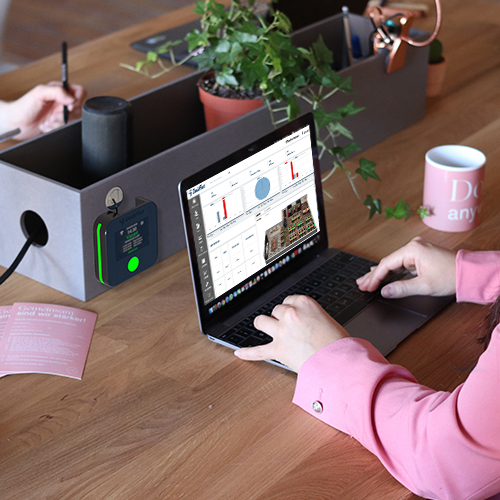
New Era Workplace Management Software: Making Back-to-Work a Success 2026
As hybrid work becomes the standard rather than the exception, organizations are rethinking how offices operate and how employees return to the workplace in a way that supports flexibility, productivity, and employee experience. Traditional workspace habits — fixed desks, paper-based scheduling, and rigid office norms — no longer fit today’s dynamic work environment. Instead, workplace management software has emerged as a cornerstone for enabling efficient office operations and successful transitions back to on-site collaboration.
Workplace management platforms help businesses not only manage space, but also shape the workplace experience, flexibility, and strategic planning needed in a hybrid world. Below is an updated guide with new headings and expanded content to reflect modern workplace trends and technology.
Why Traditional Office Habits Are Changing
After years of remote work and flexible schedules, employee expectations around work have fundamentally shifted. Habits formed during the pandemic — such as flexible hours, remote work, and digital-first collaboration — persist even as organizations encourage a return to office. This means that the old norm of assigned desks and inflexible schedules simply won’t meet the needs of today’s workforce.
Workplace management software helps bridge this gap by providing digital tools that support flexible scheduling, desk and room booking, and space utilization analytics — enabling teams to adapt to new workplace rituals with minimal disruption.
What Is Workplace Management Software?
Workplace management software is a suite of digital tools designed to help organizations streamline office operations and support hybrid work. These platforms typically include features for:
Desk and workstation booking
Visitor access management
Space utilization tracking
Reporting and analytics
Instead of relying on manual processes, employees can reserve workspaces and resources through intuitive interfaces — including mobile apps and interactive office maps.
This software transforms office management from reactive and manual into automated and data-driven, making back-to-work initiatives more effective and user-friendly.
Key Benefits of Modern Workplace Management Software
1. Streamlines Office Re-Entry
Workplace management tools ensure a smoother transition back to the office by letting employees pre-book desks and rooms, reducing uncertainty and confusion about space availability. This is vital as teams navigate hybrid schedules that mix remote and on-site work.
2. Optimizes Space Utilization
Real-time data on workspace usage helps facilities teams understand how frequently areas are used, which zones are under-utilized, and where capacity might need adjustment. This leads to smarter allocation of office resources and cost savings on physical space.
3. Supports Flexible Hybrid Work Models
Today’s workplaces must support employees who split time between home and office. Management software allows hybrid teams to see availability, reserve space, and coordinate in-office days with colleagues — all of which improve collaboration and reduce friction in scheduling.
4. Improves Employee Experience
Employees gain autonomy and control over their daily work environment via self-service booking tools. This supports a positive experience and reduces stress associated with unpredictable room or desk availability.
5. Provides Actionable Analytics
Beyond booking, modern systems deliver analytics on how space is used — offering insights that inform planning decisions, such as where to expand collaborative areas or when to reconfigure floor layouts. This data-driven approach enhances operational efficiency.
Core Features Every Modern Platform Should Include
To enable successful back-to-work outcomes, workplace management software should offer:
🔹 Interactive Floor Maps
Visual representations of office layouts make it easy for employees to choose desks, rooms, and collaboration zones.
🔹 Mobile and Calendar Integration
Syncing bookings with Outlook, Google Calendar, or Microsoft Teams ensures reservations are visible and manageable from anywhere.
🔹 Visitor and Access Management
Secure systems allow for scheduled visitor check-ins, badge printing, and access control, making office entry seamless.
🔹 Real-Time Availability and Check-In
Employees can see live availability and check in to reserved spaces, reducing no-shows and improving data accuracy.
🔹 Customization and Rules
Admins can define booking policies such as group reservations, priority scheduling, and time limits.
Integrating Workplace Management with Broader Hybrid Tech
Workplace management software does not operate in isolation — it is part of a broader ecosystem of tools that support hybrid work. Integration with collaboration platforms, communication tools, and visitor management systems ensures that office operations remain connected, seamless, and future-ready.
In 2026, organizations are increasingly investing in technology that centralizes workspace operations, improves data insights, and enhances employee experience as a strategic priority.
Best Practices for Successful Deployment
To get the most out of workplace management software, organizations should:
Define Clear Use Policies
Make sure employees understand how and when to book space, and what behavior is expected. Clear policies reduce confusion and maximize adoption.
Encourage Early Scheduling
Encourage teams to book spaces in advance to avoid last-minute conflicts and make planning predictable.
Monitor Space Trends
Use analytics dashboards to observe usage patterns and refine workplace strategy over time.
Provide Training and Support
Offer user guides, demos, and support channels so employees feel confident using the technology every day.
Effective deployment ensures that tools support both employee needs and operational goals.
The Future of Workplace Management
Looking ahead, workplace management software will continue to evolve with new capabilities such as:
✨ AI-driven recommendations for optimal desk or room allocations
✨ Predictive usage forecasting based on historical patterns
✨ Integration with wellness and sustainability metrics
✨ Advanced automation for facility operations
✨ Smart building analytics powered by sensors and IoT
These features will further enhance how teams plan, collaborate, and use office spaces — making hybrid work more efficient and user-centric.
Final Thoughts
As returning to the workplace becomes part of a long-term hybrid strategy, workplace management software has transitioned from a “nice-to-have” tool to a strategic enabler for operating effective, flexible, and future-ready offices. Organizations that embrace these technologies are better positioned to support employee satisfaction, optimize their real estate, and foster collaboration across distributed teams.
Whether your organization is just beginning its back-to-work journey or refining hybrid work strategies for 2026 and beyond, modern workplace management software is a critical foundation for success.
Frequently Asked Questions (FAQs)
1. What is workplace management software?
Workplace management software is a digital platform that helps organizations manage office spaces, desk bookings, meeting rooms, visitor access, and space utilization. It supports hybrid work models by providing real-time visibility and automated scheduling tools.
2. How does workplace management software support hybrid work?
Workplace management software enables employees to reserve desks and meeting rooms in advance, coordinate in-office days with teammates, and access real-time availability. This ensures smoother collaboration and prevents overcrowding in hybrid workplaces.
3. Why is workplace management software important for back-to-work strategies?
As employees return to the office, workplace management software provides structure and predictability. It eliminates scheduling confusion, optimizes space allocation, and improves employee confidence when planning in-office days.
4. What are the key features of workplace management software?
Key features include:
Desk and room booking
Interactive floor maps
Calendar integration
Visitor management
Real-time availability tracking
Space utilization analytics
Mobile access
These tools streamline operations and improve employee experience.
5. Can workplace management software reduce office costs?
Yes. By tracking space usage and identifying underutilized areas, companies can optimize their real estate footprint, reduce unnecessary costs, and make data-driven facility planning decisions.