Blog
Collaborative Workspace: The Complete 2026 Guide to Design, Types, Benefits & Management
A 2024 Mount-It! analysis found that high-performing companies with strong collaborative workspace design report 50 percent greater positive impact on performance compared to organizations with less effective layouts. Gensler research cited by K2 Space shows that 79 percent of employees consider varied workspace options essential to productivity. Promethean World cites research finding that 70 percent of employees believe poor collaboration negatively affects their productivity. The combined message across workplace research in 2026 is consistent: collaborative workspaces have moved from a design trend to a measurable driver of organizational performance.
But there is a gap most competing guides do not address. Every comprehensive guide on collaborative workspace design covers the physical elements: layouts, furniture, lighting, acoustics, technology hardware. Almost none covers the operational layer that determines whether those well-designed spaces actually get used as intended. The brainstorming room that becomes a quiet lounge because no one knows it is available. The collaboration zone that gets reserved for personal calls. The team neighborhood that sits empty on Monday and Friday and overflows on Wednesday. Design without management produces beautiful spaces that underperform.
This guide is the complete 2026 reference on collaborative workspaces, covering both halves: the design principles that produce effective spaces, and the operational practices and technology that activate them in modern hybrid offices. It covers what collaborative workspaces are, the 8 main types, the measurable benefits, the 8 design pillars, common mistakes, real-world examples, hybrid-specific considerations, and how workplace platforms like DeskFlex make collaborative spaces actually deliver the productivity gains they promise. Whether you are a workplace strategy lead designing a new office, a facilities director updating existing space, or an HR leader connecting workspace investment to engagement outcomes, this guide gives you the structure to act on.
What is a Collaborative Workspace?
A collaborative workspace is a physical or digital environment intentionally designed to support teamwork, communication, idea sharing, and collective problem-solving rather than purely individual focused work. In a physical office context, collaborative workspaces include brainstorming rooms, project rooms, team neighborhoods, lounge zones, breakout spaces, open collaboration areas, huddle rooms, and shared makerspaces. They typically feature movable furniture, writable surfaces, video conferencing technology, and easy reconfiguration to support different group sizes and activities.
Collaborative workspaces represent a deliberate evolution from two previous office models. The traditional cubicle model emphasized individual privacy at the expense of teamwork. The pure open-plan model that replaced it tried to maximize interaction but often produced noise, distraction, and reduced focus work without proportionate collaboration gains. Modern collaborative workspaces draw lessons from both, creating hybrid environments with distinct zones for different work modes: collaboration zones for team work, focus zones for individual concentration, social zones for informal interaction, and meeting rooms for structured discussion.
The distinction matters because “collaborative workspace” is sometimes used interchangeably with adjacent terms it is not exactly the same as:
- Flexible office space emphasizes adaptability and shared seating (hot desking, hoteling)
- Coworking spaces are shared workspaces open to multiple organizations
- Open plan offices emphasize visual openness, not necessarily collaboration enablement
- Activity-based working (ABW) is a workplace strategy where spaces are designed around activities; collaborative spaces are one type of ABW environment
Most modern workplaces blend collaborative workspace design with flexible office space and activity-based working principles. The combination produces the strongest results.
Collaborative Workspaces by the Numbers
| Stat | Figure | Source |
|---|---|---|
| Performance impact in high-performing companies with strong collaborative design | 50% greater positive impact | Mount-It!, workplace research |
| Employees who consider varied workspace options essential to productivity | 79% | Gensler research, via K2 Space |
| Employees who believe poor collaboration hurts their productivity | 70% | Promethean World, citing collaboration research |
| Increase in interaction with well-designed open and collaborative layouts | Up to 50% | Industry research |
| Engagement uplift for employees in comfortable workspaces | 15% | Harvard Business Review |
| Cost savings from efficient space utilization | Up to 30% | International Facility Management Association (IFMA) |
| Knowledge-work organizations operating hybrid in some form | 70%+ | Gartner, Future Forum Pulse |
| Real estate cost reduction with utilization-led consolidation | 30 to 50% | CBRE, Verdantix |
| Typical desk-to-employee ratio in mature hybrid offices | 0.5 to 0.7 | CBRE benchmarks |
The 8 Types of Collaborative Workspaces
Modern offices typically deploy a mix of collaborative workspace types rather than relying on a single style. The eight common types:
1. Open Collaboration Zones
Open-plan areas with cluster seating, sofas, and standing tables designed for spontaneous group work. The most common collaborative space in modern offices because it requires the least infrastructure investment while supporting frequent informal collaboration.
2. Huddle Rooms
Small enclosed meeting rooms for 2 to 4 people with a display, video conferencing capability, and writable surfaces. The workhorse of modern offices. Most hybrid offices need 1 huddle room per 8 to 12 employees, far more than the meeting rooms most offices traditionally provide.
3. Brainstorming or Project Rooms
Mid-sized rooms (4 to 8 people) with extensive writable surface area (whiteboard walls, sticky-note walls, digital whiteboards), comfortable seating, and the ability to leave work in progress visible for return sessions.
4. Team Neighborhoods
Defined zones on the floor reserved for specific teams, with team-specific furniture, displays, and storage. Particularly important in hybrid offices where team members come in on shared “anchor days” and need a coherent place to gather.
5. Lounge and Social Zones
Cafe-style seating, comfortable couches, kitchen and snack areas designed for informal conversation. Often where the most valuable cross-team interactions happen, even though they look the least like traditional workspace.
6. Makerspaces and Labs
Workshops, prototyping rooms, design labs, or specialized creative spaces with relevant equipment (3D printers, design materials, AV production gear). More common in tech companies, design firms, universities, and innovation-focused organizations.
7. Phone and Video Booths
Small one-person enclosed booths for video calls and focused phone conversations. Not technically collaborative spaces themselves, but they are essential complements to collaborative workspaces because they protect quiet zones from being colonized by call-takers.
8. Hybrid Meeting Rooms
Larger rooms specifically equipped for hybrid meetings where some participants are in the room and others join virtually. Includes wide-angle cameras, multiple displays, advanced audio capture, and intuitive controls. Now table stakes for modern offices.
Most successful workplaces deploy at least 5 of these 8 types, balanced against the office’s specific work patterns and team composition.
Benefits of Collaborative Workspaces
The benefits of well-designed collaborative workspaces fall into six categories. The relative weight varies by organization, but most mature deployments see measurable gains across all six.
1. Higher Team Productivity
The most-cited benefit. Multiple studies including Mount-It!’s analysis show that well-designed collaborative spaces produce up to 50 percent greater performance impact compared to one-size-fits-all environments. The mechanism is space-work matching: collaborative work happens in collaborative zones, focused work in focus zones, social work in social zones.
2. Faster Innovation and Problem Solving
Cross-functional collaboration accelerates when teams have spaces designed for it. Brainstorming rooms with whiteboard walls produce different output than conference rooms with rectangular tables. Project rooms where teams can leave work visible support iterative thinking that meeting-only collaboration cannot.
3. Improved Communication
Reduced friction to spontaneous conversation produces better information flow. When colleagues can grab a huddle room for a 10-minute conversation rather than scheduling a 30-minute meeting two days out, communication becomes more agile and decisions happen faster.
4. Stronger Employee Engagement and Retention
Well-designed workspaces consistently produce higher engagement scores in employee surveys. The Harvard Business Review research cited by Betsy Allen-Manning shows 15 percent higher engagement in comfortable workspaces. Engagement correlates with retention, recruiting, and productivity.
5. Better Culture and Connection
Collaborative workspaces produce serendipitous interactions that purely virtual or assigned-seat environments do not. Cross-team relationships form in lounge areas and coffee points. Mentorship happens in shared collaboration zones. Company culture lives in physical spaces and the interactions they enable.
6. Cost Efficiency
IFMA research cited by K2 Space shows 30 percent cost savings are achievable through efficient space utilization. Collaborative workspace design that matches space to actual usage patterns reduces wasted square footage. Hybrid-aligned collaborative spaces sized to peak collaboration days rather than maximum headcount produce significant real-estate savings.
The 8 Design Pillars of Effective Collaborative Workspaces
Designing a collaborative workspace that actually works requires eight foundational elements. Programs that focus on only a few of them often produce expensive disappointments.
Pillar 1: Variety over uniformity
A collaborative workspace is not a single space type. It is a portfolio of spaces matched to different activities and group sizes. Open collaboration zones, huddle rooms, brainstorming rooms, team neighborhoods, lounge areas, focus rooms, phone booths, and hybrid meeting rooms each serve different needs. Offices with only one or two space types force every activity into the wrong space.
Pillar 2: Flexibility and reconfiguration
Furniture on wheels, modular tables that combine into different configurations, movable partitions, and reconfigurable AV setups let the same square footage serve different needs at different times. A space configured as a 12-person meeting room in the morning might serve as four 3-person huddles in the afternoon.
Pillar 3: Right-sized space allocation
Most offices under-provide huddle rooms (need 1 per 8 to 12 employees) and over-provide large conference rooms. Most under-provide phone booths (need 1 per 15 to 20 employees in hybrid offices) and over-provide assigned desks. The right ratio depends on attendance patterns and work mix, but the common pattern is to redirect investment from big rooms to many small enclosed spaces plus open collaboration areas.
Pillar 4: Integrated technology
Collaborative spaces need technology that works without friction: wide-angle cameras for hybrid meetings, intuitive room controls (Crestron, Logitech Tap), wireless screen sharing (AirPlay, Miracast, dedicated solutions), digital whiteboards or whiteboard-cameras (Microsoft Whiteboard, Jamboard equivalents), and reliable high-bandwidth wifi. Technology friction shuts collaboration down faster than any other single factor.
Pillar 5: Acoustic and visual privacy
Collaboration generates noise. Adjacent quiet work suffers if collaboration zones have no acoustic separation. Effective design uses sound-absorbing materials, acoustic baffles, glass partitions for visual openness with acoustic separation, and clear zone boundaries with consistent norms. Pillar 5 is the single most under-invested element in mediocre collaborative workspace design.
Pillar 6: Lighting and comfort
Natural light access, layered task and ambient lighting, comfortable seating that does not force everyone into the same posture, and thermal comfort all affect how long people can productively use a collaborative space. Spaces that drive people back to their desks within 30 minutes are too uncomfortable to support real collaboration.
Pillar 7: Tools for thinking
Whiteboard walls (or actual writable surfaces, not just one small whiteboard), sticky-note supply, markers, easels, and digital tools that capture and persist work between sessions. Spaces that look like collaboration spaces but lack these basics are conference rooms with different furniture.
Pillar 8: Operational management
The least-discussed pillar and the one most workplace consultants skip. A beautifully designed collaborative workspace fails if no one can find available rooms, if huddle rooms get used for personal phone calls, if booking is friction-heavy, if team neighborhoods are not visibly designated, or if analytics never tell facilities teams which spaces actually work. This is where workplace technology like DeskFlex’s platform matters: real-time room booking, abandoned-meeting protection, team-presence visibility, and utilization analytics turn well-designed spaces into well-used ones.
Collaborative Workspace Ideas and Examples
Looking at concrete examples is often more useful than abstract principles. The eight examples below show how leading organizations have implemented collaborative workspace design.
Idea 1: Project-Team Neighborhoods with Persistent Visibility
Define zones on the floor as team neighborhoods, with team-specific furniture, displays, and storage. The team neighborhood becomes the team’s anchor when they come in on shared days. Includes a small collaboration zone, a few focus desks, a huddle room, and a storage area for team materials.
Idea 2: Whiteboard-Everywhere Brainstorming Rooms
Convert one or two existing meeting rooms into dedicated brainstorming rooms by replacing walls with whiteboard surfaces (writable paint, whiteboard wallpaper, or full whiteboard wall systems). Add comfortable seating in a circle rather than around a table. The space becomes useful for ideation in ways traditional conference rooms cannot match.
Idea 3: Cafe-Style Centers of Gravity
Place the kitchen, coffee, and snack area in a central location designed for lingering rather than just transit. Add comfortable seating, larger communal tables, and stand-up bars. The cafe becomes the highest-traffic informal collaboration zone in the office, often producing more cross-team interaction than any planned collaboration space.
Idea 4: Phone Booths in Volume
Most offices have 1 to 2 phone booths and need 5 to 10. Convert unused offices or carve out new booths from open space. Provide good ventilation, lighting, and acoustic treatment. The booths protect quiet zones from noise and give employees private space for personal calls, medical appointments, and confidential conversations.
Idea 5: Library-style Focus Zones
A small zone, ideally enclosed or set apart, designed for completely silent individual focus. Different from regular desks: rules are explicit (no phone calls, no conversations), atmosphere is library-quiet, and employees self-select in for deep work. Adoption among focus-work-heavy employees is often very high.
Idea 6: Flexible Event Spaces
A larger reconfigurable space that becomes a team training room in the morning, a town hall venue in the afternoon, a happy hour location in the evening, and a project war room when needed. Movable furniture, modular AV, and adaptable lighting make the same square footage serve multiple purposes.
Idea 7: Hybrid-First Conference Rooms
Equip conference rooms specifically for hybrid meetings: wide-angle cameras (or PTZ cameras with framing), high-quality omnidirectional microphones, multiple displays so remote participants are visible, and intuitive room controls so anyone can start a meeting without 5 minutes of fumbling. This investment is now table stakes for hybrid-friendly offices.
Idea 8: Outdoor and Biophilic Spaces
Where climate permits, outdoor terraces with seating, work tables, and connectivity become highly used collaborative spaces. Indoors, biophilic design (plants, natural materials, water elements where appropriate) reduces stress, improves cognitive performance, and makes collaborative spaces feel more inviting.
For more design ideas specifically connected to flexible and hybrid offices, see our flexible office space guide.
Common Collaborative Workspace Mistakes to Avoid
After many workplace deployments, the same mistakes appear repeatedly. The eight most expensive ones, all preventable.
1. Open Plan Without Zones
The most expensive mistake. Pure open-plan offices without zoning produce noise, distraction, and the productivity costs of forced overheard conversation. Open spaces need explicit zones (collaboration zones, focus zones, phone zones, social zones) with enforced norms.
2. Too Many Large Conference Rooms, Not Enough Huddle Rooms
Most offices have 1 large conference room per 50 employees but only 1 huddle room per 50 employees. The ratio should typically be reversed: 5 huddle rooms per 1 large conference room. Mid-sized offices that invert this ratio see dramatic improvements in meeting access and casual collaboration.
3. Insufficient Acoustic Treatment
Collaboration generates noise. Open collaboration zones placed next to quiet desk areas without acoustic separation make both zones underperform. Acoustic baffles, sound-absorbing materials, and clear zone boundaries are essential, not optional.
4. Technology Friction
Hybrid meeting rooms that take 5 minutes to start a meeting because of AV complexity get avoided. Wireless screen sharing that does not work the first time on the most common devices gets replaced with the laptop being passed around. Spend the budget on user-tested AV that actually works.
5. No Operational Management Layer
Beautifully designed spaces that no one can find, that get booked for the wrong purposes, that show no real-time availability, that produce no utilization data, and that no one optimizes are wasted investments. The booking and management layer is as important as the design.
6. Ignoring Hybrid Attendance Patterns
Designing collaborative spaces for 100 percent attendance when typical attendance is 50 percent produces too much wasted space on most days and not enough peak-day capacity. Size collaborative spaces against realistic peak attendance, not theoretical maximum headcount.
7. Furniture that Does Not Move
Beautiful but fixed furniture defeats reconfiguration. Tables that need three people to move them rarely get moved. Invest in furniture on wheels, modular configurations, and the operational practice of actually reconfiguring spaces.
8. Failing to Measure
Without utilization data, you do not know which spaces work and which do not. The brainstorming room that always books two weeks out vs the one that sits empty tells you what to build more of and what to repurpose. Workplace analytics closes this loop.
Collaborative Workspaces for Hybrid Teams
Hybrid work has changed what makes a collaborative workspace effective. Hybrid teams face specific challenges that traditional 5-day-in-office collaborative spaces did not address.
Challenge 1: Spontaneous Collaboration Requires People to be Present
The biggest hybrid collaboration challenge: serendipity does not scale with reduced attendance. If colleagues you need to work with are remote on the days you come in, the carefully designed collaborative zones do you no good.
Solution: Anchor days. Teams commit to specific days when they all come to the office. Anchor days concentrate attendance into collaboration-rich periods. See our flexible work arrangements guide for the policy framework.
Challenge 2: Hybrid Meetings Dominate Calendars
Half the people in a meeting are remote on most days. Conference rooms designed for in-person meetings produce poor hybrid experiences: remote participants are visually small, audio is uneven, screen sharing is awkward.
Solution: Hybrid-first room design. Every meeting room (not just the few “main” ones) should be equipped for excellent hybrid meetings: wide-angle cameras with framing, omnidirectional or distributed microphones, multiple displays so remote attendees are visible, and intuitive controls.
Challenge 3: Knowing Who is in the Office
In a hybrid context, you do not always know whether colleagues are coming in today. Collaborative spaces are dramatically less useful if the people you want to collaborate with are working from home.
Solution: Team-presence visibility through the workplace platform. DeskFlex’s desk booking and check-in shows colleagues which teammates are coming in on which days, supporting coordinated office attendance.
Challenge 4: Variable Space Demand
Some days the office is full. Other days it is half empty. Fixed collaborative space allocation does not adapt to variable attendance.
Solution: Reconfigurable spaces plus real-time booking. Movable furniture lets the same space serve different group sizes. Real-time room booking lets employees see what is available right now rather than what was scheduled three weeks ago.
Challenge 5: Remote Inclusion
The temptation in hybrid is to default to in-person collaboration with remote participants treated as second-class. This produces resentment, weakens remote contribution, and undermines the value of collaborative spaces.
Solution: Hybrid-first norms. Every collaboration includes the remote participants well, with technology designed for them. Companies that achieve this consistently see better outcomes from collaborative spaces than companies that treat hybrid as an afterthought.
Managing Collaborative Workspaces with Workplace Technology
Workplace platforms transform collaborative spaces from beautiful design artifacts into operating infrastructure. The most-overlooked aspect of collaborative workspace design is the operational layer that makes the spaces actually work day to day.
Real-time Room Availability and Booking
Without a real-time booking system, employees waste time walking to collaborative spaces that turn out to be occupied. Modern workplace platforms show real-time availability on mobile, web, and in-room displays. DeskFlex’s Room Scheduling provides this with calendar integration and abandoned-meeting protection.
Abandoned Meeting Protection
Meeting rooms booked but not used (no-shows) waste 15 to 25 percent of conference room capacity in offices without enforcement. Auto-release of unused bookings drops this to under 5 percent. The same logic applies to collaboration spaces in hybrid offices.
Team Presence Visibility
Knowing which teammates are coming in on which days transforms hybrid collaboration. DeskFlex’s check-in / check-out feeds team-presence data that lets employees coordinate office days with the colleagues they need to collaborate with.
Real-time Space Visualization
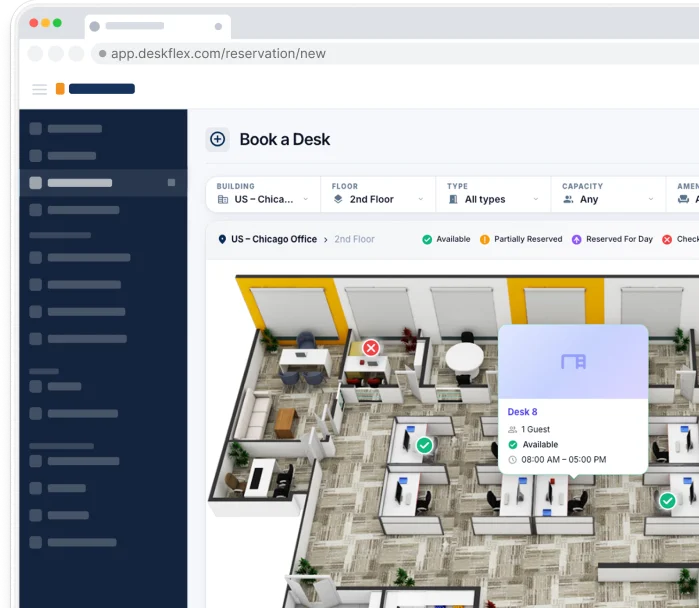
Interactive floor plans showing which collaboration zones are free, which are booked, and which have specific attributes (whiteboards, large displays, video equipment) help employees find the right space quickly. 3D floor maps make this navigable on mobile and large displays.
Room Display Screens
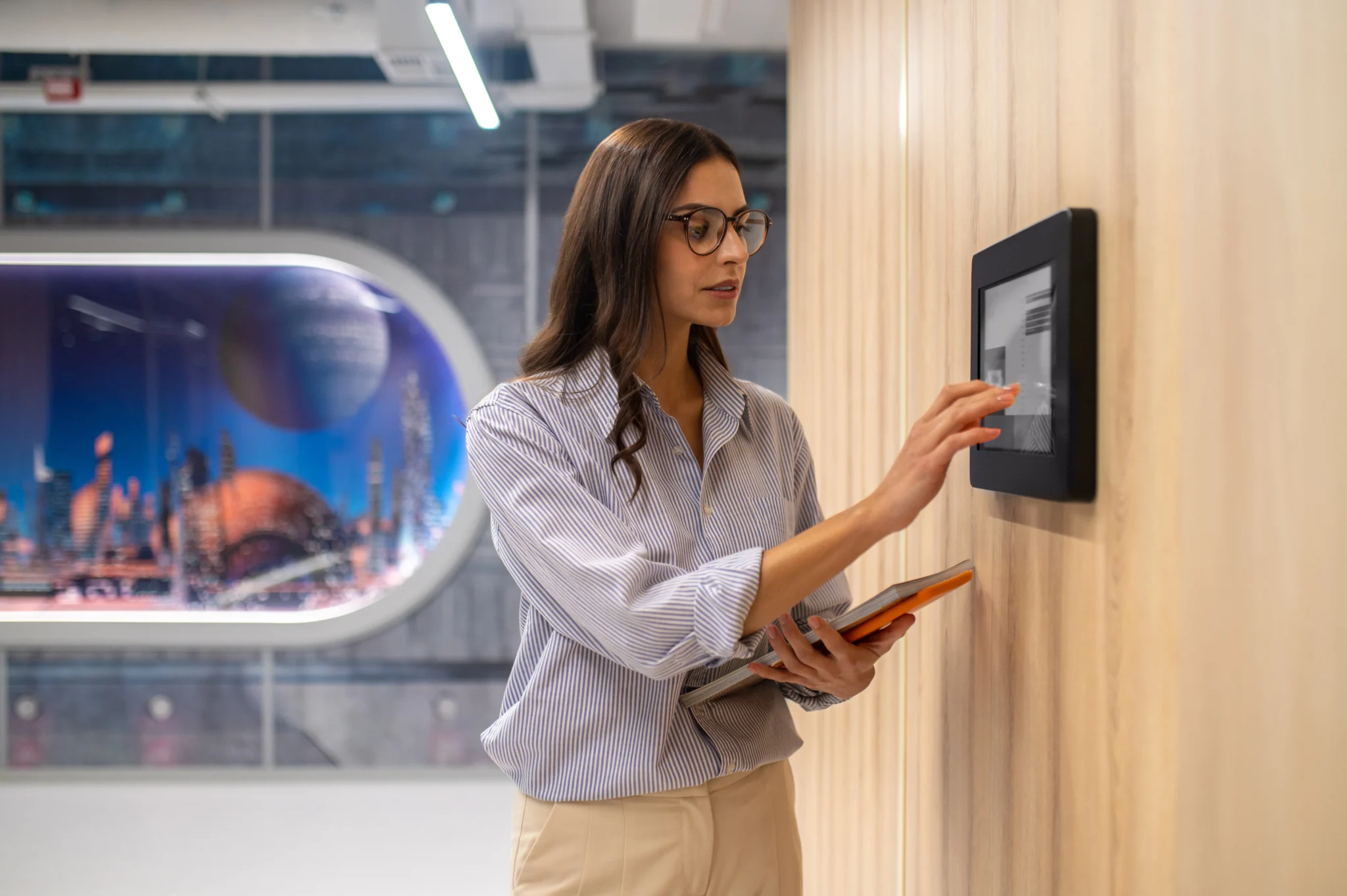
Touchscreen displays outside collaborative spaces showing booking status, allowing one-tap booking, and signaling availability from a distance with color coding. Room Display Touchscreens are now standard in modern offices.
Workplace Analytics
Utilization data tells facilities teams which collaborative spaces work, which do not, when peak demand happens, and where to invest in additional capacity. Without analytics, every design decision is guesswork. DeskFlex’s analytics connects booking, attendance, and room usage into one dashboard.
Integration with Calendar and Identity
The booking system, identity provider, calendar, and HR data should be one integrated experience for employees, not five separate tools. Native integration with Outlook, Microsoft Teams, Google Workspace, Okta, and Microsoft Active Directory is now table stakes.
How DeskFlex Supports Collaborative Workspaces
DeskFlex is a workplace management platform purpose-built for the operational side of modern offices, including the management of collaborative workspaces. The platform brings together the operational layer behind effective collaborative space deployment:
Desk Booking and Team Neighborhoods
Desk booking supports team neighborhood configurations, anchor-day scheduling, and team-presence visibility so colleagues can coordinate collaborative time together.
Room Scheduling for Huddle Rooms, Project Rooms, and Conference Rooms
Room scheduling handles all collaborative meeting space booking with calendar integration, abandoned-meeting protection, and rich room attribute filtering (look for “room with whiteboard wall and large display”).
Room Display Touchscreens
Room Display Touchscreens outside collaborative spaces show real-time booking, allow one-tap booking, and signal availability with color-coded indicators visible from a distance.
Workstation Touchscreens at Collaboration Desks
Workstation Touchscreens at individual desks show booking, check-in, and team-presence status for the surrounding zone.
Check-in and Check-out for Real-time Presence
Check-in / check-out gives real-time occupancy visibility, supporting team coordination, emergency response, and utilization analytics.
Space Management and 3D Floor Maps
Space management with 3D floor maps supports design iteration, scenario modeling, and visual booking.
Analytics for Utilization-led Decisions
Workplace analytics connects booking, attendance, and room usage data so facilities teams can see which collaborative spaces work and which need redesign.
Visitor Management for Cross-Organization Collaboration
Visitor management handles external collaborators (partners, clients, contractors, advisors) who participate in collaborative work without being employees.
Deployment Flexibility
Cloud SaaS for most organizations, with on-premise deployment available for regulated industries (healthcare, government, education, finance) that need data residency or specific compliance.
Book a 30-minute demo to walk through how DeskFlex supports collaborative workspaces in your specific office.
Conclusion
Collaborative workspaces have moved from a design trend to a measurable driver of organizational performance. The combination of well-designed physical spaces (with 8 distinct types from huddle rooms to team neighborhoods to hybrid meeting rooms) plus the operational management layer (booking, scheduling, analytics) determines whether collaborative workspace investments produce the productivity, engagement, and innovation outcomes they promise. Design alone produces beautiful spaces that often underperform. Management alone produces well-coordinated mediocre spaces. The combination produces both.
For most modern offices, the highest-leverage moves are: deploying a mix of collaborative space types (not just one or two), right-sizing huddle rooms and phone booths to actual needs (not aspirational headcount), investing in hybrid-first AV in every meeting room, acoustic separation between collaboration and focus zones, reconfigurable furniture that supports actual reconfiguration, and a workplace platform that handles booking, presence visibility, and analytics. Done well, the combination delivers 30 to 50 percent real estate efficiency improvements, measurable productivity and engagement gains, and a workplace experience that employees and candidates notice.
If you are designing, redesigning, or managing collaborative workspaces in a hybrid office, DeskFlex’s platform handles the operational layer that turns design investment into measured outcomes. Book a 30-minute demo to walk through how DeskFlex fits your specific collaborative workspace strategy.
Frequently Asked Questions (FAQs)
What is a collaborative workspace?
A collaborative workspace is a physical or digital environment intentionally designed to support teamwork, communication, idea sharing, and collective problem-solving rather than purely individual focused work. In a physical office context, collaborative workspaces include brainstorming rooms, huddle rooms, project rooms, team neighborhoods, lounge zones, open collaboration areas, and hybrid meeting rooms. They typically feature movable furniture, writable surfaces, integrated technology, and easy reconfiguration to support different group sizes and activities. Modern collaborative workspaces sit between traditional cubicle offices (which emphasized privacy) and pure open-plan offices (which often produced noise and distraction without proportionate collaboration gains).
What are the main types of collaborative workspaces?
The eight main types are:
(1) open collaboration zones for spontaneous group work;
(2) huddle rooms for 2 to 4 person small meetings;
(3) brainstorming or project rooms with extensive writable surfaces;
(4) team neighborhoods reserved for specific teams;
(5) lounge and social zones for informal interaction;
(6) makerspaces and labs with specialized equipment;
(7) phone and video booths that complement collaborative spaces by protecting quiet zones;
(8) hybrid meeting rooms specifically equipped for in-person plus remote meetings.
Most modern offices deploy at least 5 of these 8 types, balanced against work patterns and team composition.
What are the benefits of a collaborative workspace?
The six main benefits are: higher team productivity (Mount-It! research shows up to 50 percent greater performance impact in companies with effective collaborative design); faster innovation and problem solving through reduced collaboration friction; improved communication and information flow; stronger employee engagement and retention (HBR research shows 15 percent higher engagement in comfortable workspaces); better culture and connection through serendipitous interactions; and cost efficiency through utilization-led space optimization (IFMA research shows 30 percent typical cost savings). The combination of these benefits has made collaborative workspace design a measurable driver of organizational performance.
How do you design a collaborative workspace?
Effective collaborative workspace design follows eight pillars: variety over uniformity (multiple space types matched to different activities); flexibility and reconfiguration (movable furniture, modular spaces); right-sized space allocation (more huddle rooms, fewer large conference rooms, sufficient phone booths); integrated technology (camera, microphone, screen sharing, digital whiteboards); acoustic and visual privacy between zones; lighting and comfort for sustained use; tools for thinking (whiteboard walls, supplies); and operational management through booking systems, abandoned-meeting protection, and utilization analytics. The eighth pillar is the one most workplace consultants skip and the one that determines whether well-designed spaces actually get used as intended.
What are some collaborative workspace ideas?
Eight concrete ideas:
(1) project-team neighborhoods with team-specific zones, furniture, and storage;
(2) whiteboard-everywhere brainstorming rooms with writable walls instead of single whiteboards;
(3) cafe-style centers of gravity that combine kitchen, coffee, and seating for informal collaboration;
(4) phone booths in volume (typically need 5 to 10, most offices have 1 to 2);
(5) library-style focus zones for completely silent individual work;
(6) flexible event spaces that reconfigure throughout the day;
(7) hybrid-first conference rooms with wide-angle cameras and intuitive controls;
(8) outdoor and biophilic spaces where climate permits. The right mix depends on your specific office, team composition, and work patterns.
How does a collaborative workspace boost productivity?
Collaborative workspaces boost productivity through three main mechanisms: space-work matching that lets employees use the right space for the right activity (focus zones for focus, collaboration zones for collaboration); reduced friction to spontaneous teamwork that accelerates information flow and decision-making; and improved engagement through better workspace experience that correlates with productivity. Mount-It! research shows up to 50 percent greater performance impact in companies with effective collaborative design. Promethean World cites research showing 70 percent of employees believe poor collaboration negatively affects their productivity, so reducing collaboration friction has measurable productivity returns.
What is the difference between a collaborative workspace and an open office?
Open offices emphasize visual openness through removal of walls and cubicles; collaborative workspaces emphasize active enablement of teamwork through varied zones, integrated technology, and operational management. Pure open offices often produce noise and distraction without proportionate collaboration gains because they assume openness alone produces collaboration. Modern collaborative workspaces include zoned design (collaboration zones, focus zones, social zones), acoustic separation, technology integration, and explicit norms about which spaces are used for which activities. All collaborative workspaces typically include some open elements, but openness is one ingredient among many rather than the defining feature.
How many collaborative workspaces does my office need?
A common rule of thumb for hybrid offices: at least 1 huddle room per 8 to 12 employees, 1 phone or video booth per 15 to 20 employees, 1 large conference room per 40 to 50 employees, plus open collaboration zones representing 15 to 25 percent of total floor space, plus 1 to 2 lounge or social areas per floor. Specific ratios depend on work patterns, team composition, and peak attendance. Organizations doing more cross-functional and project-based work typically need more collaborative space than organizations doing more individual specialist work.
What technology do you need for a collaborative workspace?
The essential collaborative workspace technology stack includes: high-bandwidth wifi throughout, hybrid-meeting AV in all conference rooms (wide-angle cameras, omnidirectional microphones, multiple displays, intuitive room controls), wireless screen sharing that works on common devices, digital whiteboards or whiteboard cameras for capturing brainstorm output, and a workplace platform that handles room booking, abandoned-meeting protection, real-time availability displays, and utilization analytics. The combination of physical AV and the workplace management platform determines whether collaborative spaces actually deliver on their design potential.
How do hybrid teams use collaborative workspaces?
Hybrid teams face specific collaborative workspace challenges: spontaneous collaboration requires people to be present, hybrid meetings dominate calendars, knowing who is in the office is harder, space demand is variable, and remote inclusion requires deliberate effort. Effective hybrid collaborative workspace strategies include: anchor days that concentrate attendance, hybrid-first conference room design with strong AV in every room (not just the main one), team-presence visibility through workplace platforms, reconfigurable spaces that adapt to variable attendance, and hybrid-first meeting norms that include remote participants well rather than treating them as second-class.
What are the most common mistakes in collaborative workspace design?
Eight common mistakes: open plan without zoning that produces noise instead of collaboration; too many large conference rooms and not enough huddle rooms; insufficient acoustic treatment between collaboration and focus zones; technology friction that makes employees avoid the spaces; no operational management layer for booking, finding, and measuring usage; ignoring hybrid attendance patterns and sizing for full attendance; furniture that does not move and prevents reconfiguration; and failing to measure utilization so you do not know which spaces work. All are preventable with deliberate design and ongoing operational management.
How does DeskFlex help manage collaborative workspaces?
DeskFlex provides the operational layer that activates collaborative spaces: real-time room booking with calendar integration, abandoned-meeting protection for unused bookings, team-presence visibility for hybrid coordination, room display touchscreens outside collaborative spaces, 3D floor maps for navigation, workstation touchscreens for desk-level booking, check-in and check-out for occupancy tracking, and utilization analytics for evidence-based design decisions. The platform turns beautifully designed collaborative spaces into well-used operating infrastructure. Both cloud SaaS and on-premise deployment are available for organizations with specific compliance requirements. Book a demo.
How do you measure the success of a collaborative workspace?
Measure success across four dimensions: utilization (booking rates, check-in compliance, time-of-day patterns, peak vs trough days), space-work fit (whether the right activities happen in the right spaces, often surveyed qualitatively), productivity proxies (output metrics relevant to your business, time-to-decision, collaboration frequency), and employee satisfaction (engagement scores, workspace satisfaction surveys, eNPS). Review quarterly. The strongest signal of a successful collaborative workspace deployment is rising employee satisfaction combined with rising utilization. The strongest signal of a struggling deployment is high investment with low usage and low satisfaction.
What is the ROI of investing in collaborative workspaces?
ROI varies by organization and deployment depth, but typical figures from industry research include: 30 percent cost savings from efficient space utilization (IFMA), 50 percent performance impact in companies with strong collaborative design (Mount-It!), 15 percent engagement uplift in comfortable workspaces (HBR), and 30 to 50 percent real estate cost reduction through utilization-led consolidation (CBRE, Verdantix). Most mid-market collaborative workspace investments pay back within 12 to 24 months when combined with hybrid policy alignment and proper operational management. The combination of design plus management produces stronger returns than design alone.


Support
Demo
Blog
Newsroom