Hybrid work has become a defining model for modern organizations seeking flexibility, productivity, and long term workforce sustainability. It combines office based collaboration with remote work freedom, allowing employees to choose environments that support their productivity and focus.
According to Gallup, more than 50 percent of employees prefer hybrid work due to better balance and reduced commuting stress, as highlighted in their workplace research . Organizations adopting this model are also seeing higher engagement, better retention rates, and improved operational efficiency across distributed teams.
What Is a Hybrid Work Model?
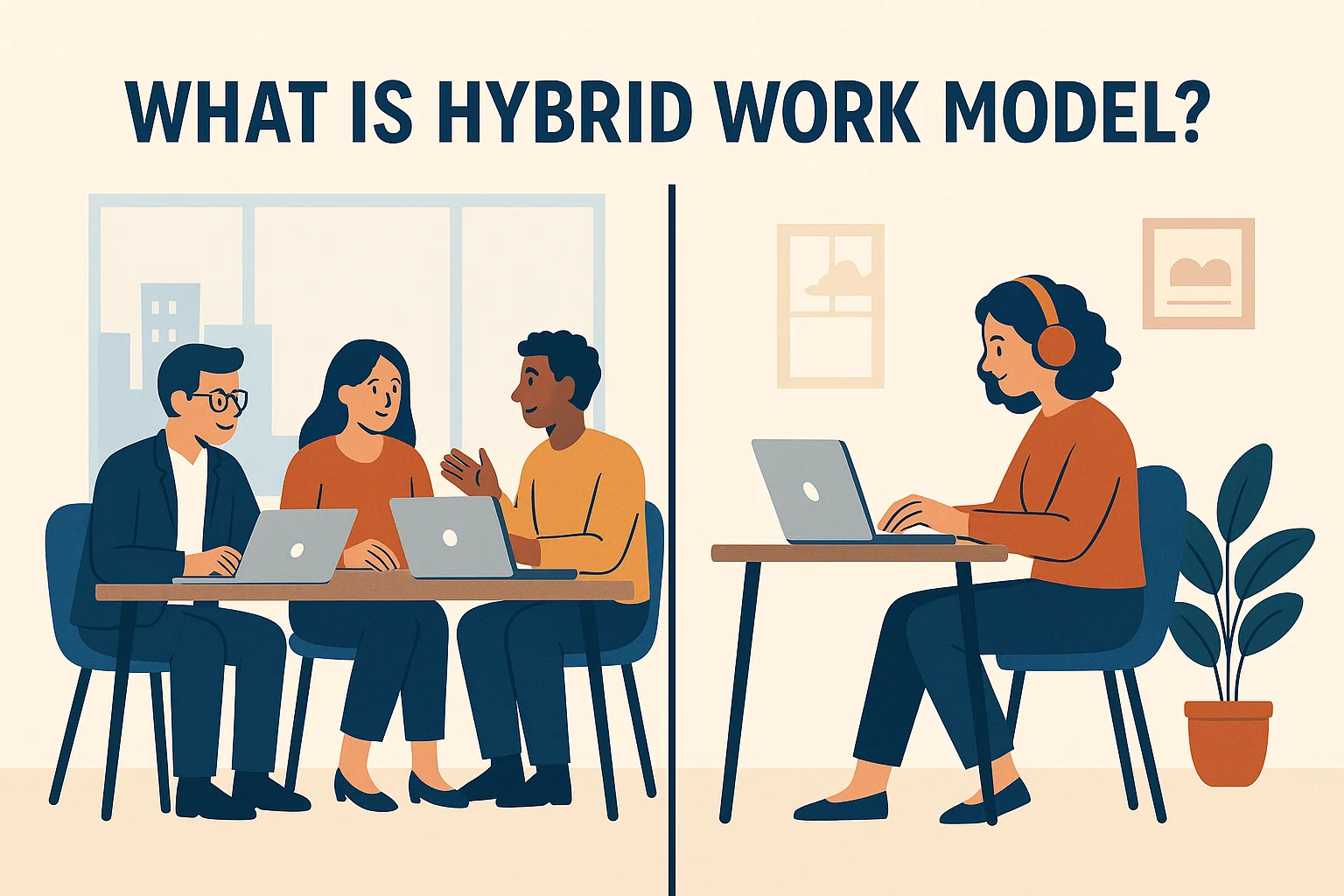
A hybrid work model is a flexible working approach where employees divide their time between office locations and remote environments. It allows organizations to balance business requirements with employee preferences, creating a more adaptive and efficient workplace experience.
This model supports both independent work and collaborative tasks by giving employees control over how and where they complete their responsibilities. As a result, companies can maintain productivity while improving employee satisfaction and overall engagement.
Types of Hybrid Work Models with Examples
Hybrid work models vary based on organizational goals, team structures, and the level of collaboration required for daily operations. Companies adopt different approaches depending on how they want employees to communicate, collaborate, and complete their tasks efficiently.
1. Flexible Hybrid
In a flexible hybrid model, employees have the freedom to choose when and where they work based on their tasks and priorities. This approach allows individuals to work from home for focused tasks and visit the office when collaboration or meetings are required.
This model works best for roles that require independence, creativity, and minimal supervision throughout the workday. It also supports better work life balance by giving employees control over their schedules and working environments.
Example:
A software development company allows engineers to work remotely during coding tasks but encourages office visits for sprint planning and team discussions.
2. Fixed Hybrid
In a fixed hybrid model, organizations assign specific days for working in the office and remotely to maintain structure and consistency. Employees follow a set schedule, such as working in the office three days a week and remotely on the remaining days.
This approach makes it easier to coordinate meetings, plan collaboration, and ensure that team members are available at the same time. It is ideal for teams that require regular interaction but still want some level of flexibility.
Example:
A marketing team works from the office on Monday, Wednesday, and Friday for meetings and collaboration, while using remote days for focused campaign work.
3. Office First Hybrid
In an office first hybrid model, employees primarily work from the office, with limited remote work allowed when needed. The office remains the central place for daily operations, collaboration, and decision making.
This model is suitable for organizations that rely heavily on in person communication, client interaction, and team coordination. It helps maintain strong workplace culture while still offering occasional flexibility.
Example:
A financial services firm requires employees to work from the office most days but allows remote work during report preparation or administrative tasks.
4. Remote First Hybrid
In a remote first hybrid model, employees work remotely most of the time and only visit the office for important meetings or team collaboration sessions. The primary focus is on digital communication and distributed work environments.
This model allows companies to hire talent from different locations while reducing the need for large office spaces. It is especially useful for organizations that operate across multiple regions or time zones.
Example:
A global startup operates with fully remote teams and organizes quarterly in person meetups for strategy discussions and team building activities.
Type | Pros | Cons |
|---|---|---|
Flexible Hybrid Work Model | Employees have autonomy to choose work locationSupports work-life balanceIncreases engagement and job satisfaction | Coordination can be challengingOverlapping schedules may cause unpredictabilityRequires strong communication tools |
Fixed Hybrid Work Model | Clear structure for teamsEasier to schedule meetings and collaborationPredictable in-office days improve planning | Less flexibility for employeesMay not suit personal schedulesCan feel rigid for some roles |
Office-First Hybrid Work Model | Strengthens team cultureEncourages face-to-face collaborationEasier client interactions and engagement | Reduced flexibilityIncreased commuting timeMay lower employee satisfaction for remote-preferred staff |
Remote-First Hybrid Work Model | High flexibility for employeesAccess to global talentReduced commuting and focus on productivity | Team culture can weakenLimited in-person collaborationCoordination for meetings can be challenging |
Why Companies Are Adopting Hybrid Work Models in 2026
Organizations across industries are rapidly adopting hybrid work models as workplace expectations continue evolving in a competitive global environment. This shift is not just a trend, but a strategic response to changing employee needs and business priorities.
1. Cost Optimization and Efficient Resource Management
Companies are reducing operational costs by optimizing office space usage and minimizing expenses related to rent, utilities, and maintenance. Instead of maintaining large offices for full capacity, organizations are using shared spaces that align with hybrid schedules.
This approach allows businesses to allocate resources more effectively and invest savings into technology, employee benefits, and growth initiatives. As a result, companies can operate more efficiently while maintaining productivity and performance across teams.
2. Improved Employee Satisfaction and Retention
Hybrid work enables employees to balance their personal and professional responsibilities by offering greater control over their schedules and work environments. Reduced commuting time and flexible working hours contribute to lower stress levels and higher job satisfaction.
When employees feel supported and valued, they are more likely to stay with the organization for a longer period. This helps companies reduce turnover costs and build a more stable and engaged workforce over time.
3. Access to a Wider and More Diverse Talent Pool
Hybrid work removes geographic limitations, allowing companies to hire skilled professionals from different cities, regions, and even countries. This expanded access to talent helps organizations find the best candidates without being restricted to a single location.
A diverse workforce brings new perspectives, ideas, and problem solving approaches that drive innovation and creativity. This competitive advantage allows companies to build stronger teams and stay ahead in rapidly changing markets.
4. Increased Productivity and Performance
Hybrid models allow employees to work in environments that best support their tasks, whether it involves focused individual work or collaborative team activities. This flexibility helps employees perform at their best without being limited to a single work setting.
Organizations benefit from improved output, better time management, and more efficient workflows across distributed teams. By aligning work environments with task requirements, companies can achieve higher productivity levels.
5. Data Driven Decision Making and Workplace Optimization
Companies are increasingly using workplace data and analytics to improve decision making and optimize hybrid work strategies. Insights from space usage, employee behavior, and scheduling patterns help organizations refine their operations.
This data driven approach enables continuous improvement by identifying inefficiencies and adjusting strategies based on real performance metrics. Over time, businesses can create more effective and scalable hybrid work environments.
Advantages of Hybrid Work Model
Hybrid work creates opportunities for improved productivity, flexibility, and business efficiency when implemented with the right strategy and tools.
1. Flexibility and Work Life Balance
Employees can choose work environments that align with their tasks, allowing them to manage responsibilities more effectively throughout the day. Reduced commuting time helps lower stress levels and gives employees more time for personal activities and family commitments.
Keep Exploring
More guides on workplace management, desk booking, and hybrid work.
This flexibility leads to higher job satisfaction and supports long term employee well being, which positively impacts overall engagement.
2. Improved Productivity and Performance
Hybrid work allows employees to focus in quiet remote environments while still benefiting from in person collaboration during office days. This balance helps individuals complete deep work tasks efficiently and participate in team activities when needed.
As a result, organizations often experience better output, improved time management, and stronger overall performance across teams.
3. Cost Efficiency for Businesses
Organizations can reduce office related expenses by optimizing workspace usage and minimizing the need for large physical offices. Costs related to rent, utilities, and maintenance can be significantly lowered through shared or flexible office setups.
These savings allow companies to invest more in technology, employee benefits, and business growth initiatives.
4. Access to Global Talent
Hybrid work removes geographic barriers, allowing companies to hire skilled professionals from different regions and backgrounds. This broader talent pool helps organizations find the right expertise without being limited to a single location.
A diverse workforce brings fresh perspectives, encourages innovation, and strengthens overall team performance in competitive markets.
Disadvantages of Hybrid Work Model
Despite its advantages, hybrid work also presents challenges that organizations must address to maintain efficiency and employee satisfaction.
1. Coordination and Scheduling Challenges
Managing schedules across remote and in office employees can become complex without proper planning and structured systems. Teams may face difficulties aligning availability, booking shared spaces, and organizing meetings efficiently.
Without clear coordination, these challenges can reduce productivity and create confusion within teams.
2. Communication Gaps
Remote employees may miss informal conversations and spontaneous discussions that naturally happen in office environments. This can lead to misunderstandings, slower decision making, and reduced collaboration across teams.
Organizations need strong communication tools and structured processes to ensure everyone stays informed and connected.
3. Maintaining Company Culture
Building and maintaining a strong company culture becomes more difficult when employees are not regularly present in the same physical space. Lack of in person interaction can weaken relationships and reduce team cohesion over time.
Companies must actively invest in engagement activities, communication strategies, and team building efforts to maintain a strong culture.
4. Inequality Between Employees
Differences in visibility and access to opportunities may arise between remote and in office employees if not managed properly. Employees working remotely may feel less recognized or included in important decisions and discussions.
Organizations must ensure equal access to meetings, feedback, and growth opportunities to maintain fairness and trust.
5. Role and Industry Limitations
Not all roles can be effectively performed in a hybrid work environment, especially those requiring physical presence or specialized equipment. Certain industries depend heavily on in person interaction and cannot fully adopt hybrid models.
Companies must evaluate job roles carefully and design hybrid strategies that align with operational requirements.
What is the Difference Between Remote and Hybrid Work?
Hybrid work and remote work both support flexible working, but they differ in how employees connect with physical office spaces. Understanding this difference helps companies choose the right model for productivity, culture, and operational efficiency.
Hybrid Work
Hybrid work is a flexible model where employees split their time between working in the office and working remotely. It combines in person collaboration with remote productivity, helping companies balance flexibility, teamwork, and workplace culture.
Remote Work
Remote work is a model where employees perform their job duties outside the company office full time. Teams collaborate using digital tools, and employees can work from home, coworking spaces, or other approved locations.
Aspect | Hybrid Work | Remote Work |
|---|---|---|
Work Location | Employees work both from home and in the office | Employees work entirely outside the office |
Flexibility | Balanced flexibility with planned office days | Maximum flexibility with no office requirement |
Collaboration | In-person collaboration on designated office days | Collaboration happens fully through digital tools |
Company Culture | Easier to maintain culture through face-to-face interaction | Requires intentional efforts to build culture remotely |
Technology Dependence | Uses digital tools along with in-office collaboration | Fully dependent on digital communication and tools |
Best For | Teams needing flexibility and regular collaboration | Fully distributed teams and independent roles |
Best Practices for Managing Hybrid Work Successfully
To make hybrid work productive and sustainable, organizations must adopt structured strategies that align with business goals and employee needs. Following proven practices ensures efficiency, engagement, and long-term success.
1. Set Clear Expectations
Employees should clearly understand their responsibilities, performance goals, and availability to avoid confusion or misaligned priorities. Clear expectations allow managers to measure success based on results rather than time spent online.
Example: Defining core office hours and remote work deliverables ensures every team member knows what success looks like.
2. Create Structured Schedules
Balancing fixed office days with flexible remote work provides consistency while supporting employee productivity. Structured schedules allow teams to collaborate effectively without limiting personal work time.
Example: Teams meet in the office every Monday and Wednesday for planning sessions, while remote days focus on deep work.
3. Invest in the Right Technology
Reliable tools for scheduling, communication, and collaboration are essential to maintain smooth workflows across locations. Technology reduces friction and helps teams stay aligned regardless of work environment.
Example: Platforms for desk booking, virtual meetings, and project management streamline hybrid workflows for distributed teams.
4. Ensure Equal Access
All employees must have equal access to meetings, information, and growth opportunities, whether working remotely or in the office. Equal access fosters fairness, engagement, and trust within the organization.
Example: Recording meetings and providing shared documentation ensures remote employees receive the same information as those on-site.
5. Strengthen Company Culture
Intentional engagement activities, team meetings, and communication initiatives keep employees connected to company values. A strong culture improves collaboration, retention, and overall employee satisfaction.
Example: Virtual team-building sessions and quarterly in-person workshops reinforce relationships and shared organizational goals.
6. Continuously Improve Strategy
Organizations should regularly collect employee feedback and analyze performance metrics to refine hybrid work policies. Continuous improvement ensures the model adapts to changing needs and remains effective.
Example: Conducting quarterly surveys helps identify workflow challenges and informs adjustments to schedules, tools, and collaboration methods.
Manage Your Hybrid Workplace with DeskFlex
Managing a hybrid workplace requires reliable tools that simplify scheduling, improve collaboration, and optimize office space utilization. DeskFlex provides a centralized solution that helps organizations manage desk booking, meeting room booking, and employee schedules efficiently.
With DeskFlex’s hybrid work software, employees can plan office visits, reserve workspaces, and coordinate with teams without confusion or delays. Managers gain access to real time insights that support better decision making and improve overall workplace efficiency.
Ready to optimize your hybrid workplace? Book a free DeskFlex demo today and discover how you can simplify scheduling, improve collaboration, and maximize workplace productivity.